Overview
An AWS account is a container for identities (users, etc) and AWS resources
- Like a container → Things within the account can access anything else within that same account only
- Like a boundary → Contains any damage caused within those accounts
- Unless you explicitly allow something, then no access is allowed in your AWS account
- Things you need when making one: Name, unique email, payment method
- email is used to create the root user
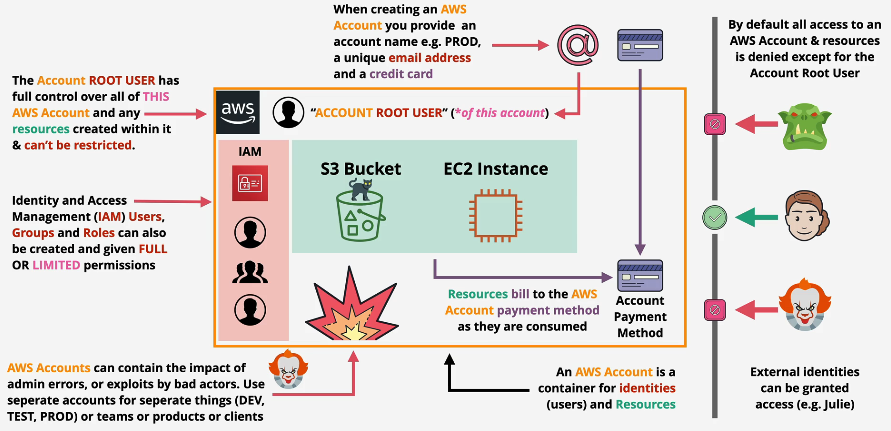
- Root user
- Initially, the root user is the only identity with an AWS account
- Every AWS account has a root user
- has full control over the AWS acc & any resources
- always have full access (x restrictions)
- Identities
- You can create multiple identities in your AWS account which can be restricted
- Unless specified otherwise, any IAM identities created in my account won’t be able to access your account
- explicitly grant permissions
- IAM & Identities
Best Practices
- Don’t use the root account except for AWS account setup
- One AWS user = One physical user
- Assign users to groups and assign permissions to groups
- Create strong password policy
- Use MFA
- Create and use Roles for giving permissions to AWS services
- Use Access Keys for Programmatic Access (CLI/SDK)
- NEVER SHARE IAM users & Access Keys
Setting up an AWS Account
- Add MFA
- Add a budget
- Enable Budget preferences
- Enable IAM User & Role Access to billing