Entity
Process of telling your JPA provider (like Hibernate) how to translate the object-oriented relationships in your code into the foreign key relationships used by a relational database
- Establishes relationships with each other through object references
- Entity Design - Mapping a single entity to a DB table
- Now, we want to map the relationship between entities
- The most important/difficult concept in JPA
Types of Relationships
Entity relationships can be categorized based on two main criteria:
- Directionality: Based on the direction of the object reference, relationships can be unidirectional or bidirectional.
- Multiplicity: Based on the number of objects that can be referenced, relationships can be One-to-Many (1:N), Many-to-One (N:1), Many-to-Many (N:N), or One-to-One (1:1).
- One to Many (1: N) 일대다 -
@OneToMany - Many to One (N:1) 다대일 -
@ManyToOne - Many to Many (N:N) 다대다 -
@ManyToMany - One to One (1:1) 일대일 -
@OneToOne
- One to Many (1: N) 일대다 -
Example
For example, let’s take a One-to-Many relationship between Member and Order.
- Unidirectional One-to-Many:
- The
Memberentity has aList<Order>. - The
Orderentity has no reference back to theMember. - Only the
Member“knows” about the relationship. You can navigate from a member to their orders, but not from an order back to its member.
- The
- Bidirectional One-to-Many:
- The
Memberentity has aList<Order>. - The
Orderentity also has aMemberfield. - Both entities “know” about the relationship. You can navigate from a member to their orders, and you can also navigate from an order back to the member who placed it.
- The
Mini Example
- Before
- Relationship between
MemberandOrders(One-to-Many):- One member can place multiple orders.
- Relationship between
OrdersandCoffee(Many-to-Many):- One order can contain multiple types of coffee.
- One type of coffee can be part of multiple orders.
- Relationship between
- After
- A Many-to-Many (N:N) relationship is typically redesigned into a pair of One-to-Many (1:N) and Many-to-One (N:1) relationships using an intermediate table. The relationship above is therefore changed as follows:
OrdersandOrder_Coffee: One-to-Many (1:N)Order_CoffeeandCoffee: Many-to-One (N:1)
Diagram
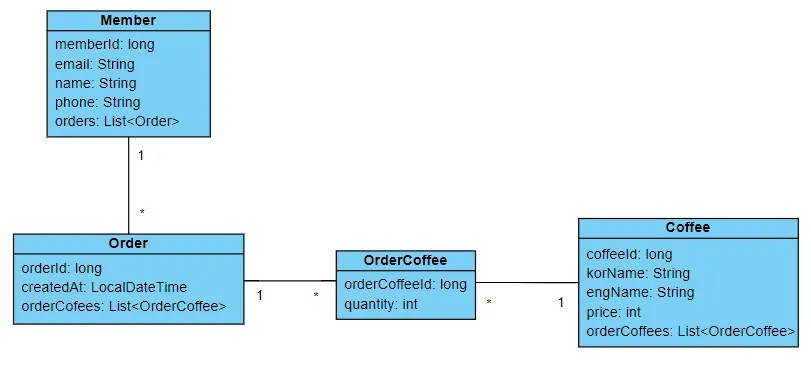
MemberEntity class- One member can have multiple orders ⇒1:N relationship with
Orderclass List<Order>field added toMemberclass- Database tables are related using foreign keys, but classes are related through object references
- One member can have multiple orders ⇒1:N relationship with
OrderEntity Class- The
Orderclass originally has a Many-to-Many relationship with theCoffeeclass. - To resolve this, a
List<OrderCoffee>member variable is added, which breaks the N:N relationship into a 1:N relationship (fromOrdertoOrderCoffee). - has NO reference to
Member
- The
CoffeeEntity Class- Similarly, the
Coffeeclass has a Many-to-Many relationship with theOrderclass. AList<OrderCoffee>member variable is added here as well to create a 1:N relationship (fromCoffeetoOrderCoffee).
- Similarly, the
OrderCoffee(Join) Entity- Because
OrderandCoffeehave a Many-to-Many relationship, theOrderCoffeeclass was added to break this into two separate 1:N, N:1 relationships. - A
quantitymember variable was added because an order can include more than one of the same type of coffee.
- Because
Unidirectional Relationships (단방향)
Overview
A relationship where only one of the two classes holds a reference to the other is called a unidirectional relationship.
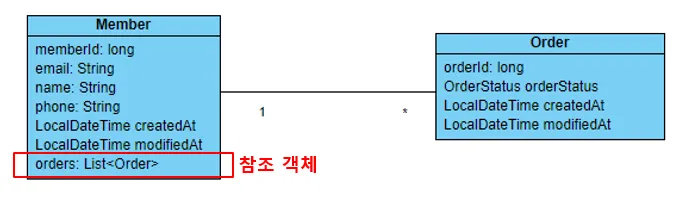
- The
Memberclass contains aListofOrderobjects ⇒ it can reference theOrders.- Therefore, a
Membercan access information about itsOrders.
- Therefore, a
- However, the
Orderclass has no reference to theMemberclass, so from anOrder’s perspective, it cannot know whichMemberit belongs to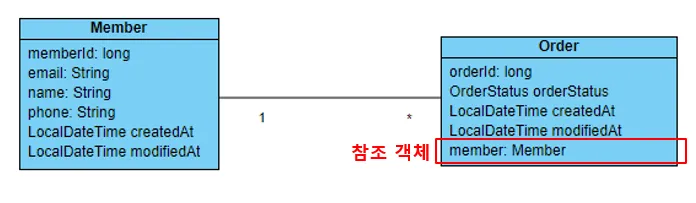 -
- Orderclass holds a reference to aMemberobject, so it can access theMember’s information- However, the
Memberclass has no reference to theOrderclass, so from aMember’s perspective, it cannot know about itsOrders - CANNOT PUT
member_Id- Since JPA is an ORM, if we just add
member_Idit will interpret this as just referring to one specific column inMemberand not the entireMemberentity itself - If we have
Order, it should be able to bring the entireMember
- Since JPA is an ORM, if we just add
- When you fetch an
Order, JPA automatically uses the foreign key ofMember memberto retrieve the fullMemberentity for you
Bidirectional Relationships
Overview
Both classes hold reference to the other
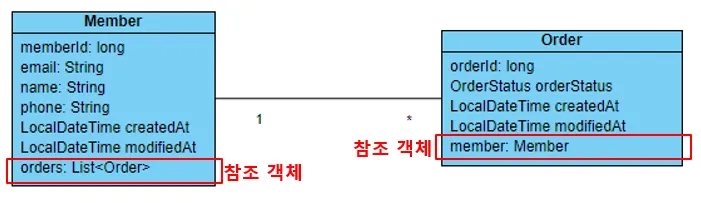
Member- contains a
ListofOrderobjects, allowing it to reference and access information about itsOrders
- contains a
Order- also holds a reference to a
Memberobject, allowing it to access information about itsMember
- also holds a reference to a
- Because both classes hold a reference to each other, a
Membercan know about itsOrders, and anOrdercan know about theMemberit belongs to. This type of relationship, where both sides hold a reference to the other, is called a bidirectional relationship - JPA (ORM) supports both unidirectional and bidirectional relationships, whereas Spring Data JDBC only supports unidirectional relationships.
One-to-Many + Unidirectional (일대다, 단방향)
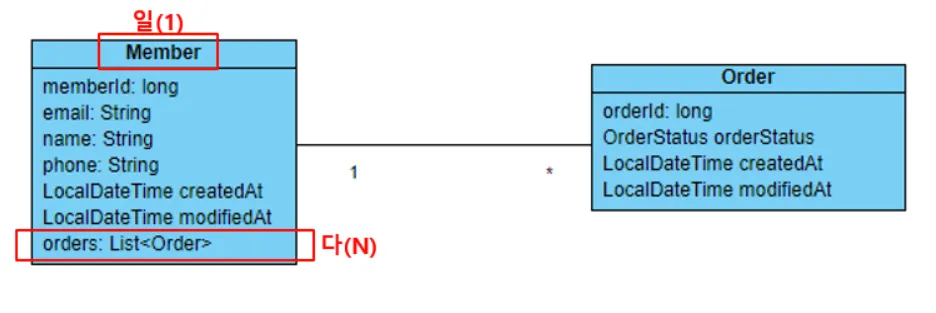
- A one-to-many (1:N) relationship means that one class (the “one” side) can hold references to multiple objects of another class (the “many” side).
Member- One member can place multiple orders, so
MemberandOrderhave a one-to-many relationship. - Because only the
Memberclass holds a reference to aList<Order>, this is also a unidirectional relationship.
- One member can place multiple orders, so
NOT commonly used - look at DB table
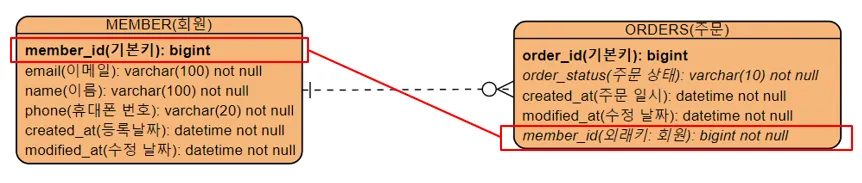
- In database tables, the “many” side holds the foreign key
- so
Orderhasmember_id
- so
- But like in our first diagram, if we make this one to many unidirectional, then the
Orderclass doesn’t have a reference to theMemberclass, which is what corresponds to the foreign key in the db - so the object structure doesn’t align well with the db table relationship
- Why learn this?
- when creating bidirectional relationships ⇒ first establish a many-to-one unidirectional mapping, and then, if necessary, add the one-to-many mapping to the other side to complete the bidirectional relationship
One-One
- Mapping a one-to-one (1:1) relationship follows the same logic as a many-to-one relationship; you simply use the
@OneToOneannotation instead. - The recommended approach is to first create the unidirectional mapping on the entity whose table holds the foreign key. Then, if needed, you can make it bidirectional by adding
@OneToOne(mappedBy = "...")to the other side.
⭐Many-to-One + Unidirectional (다대일, 단방향)
Overview
A many-to-one (N:1) relationship means that the class on the “many” side holds a reference to an object of the class on the “one” side.
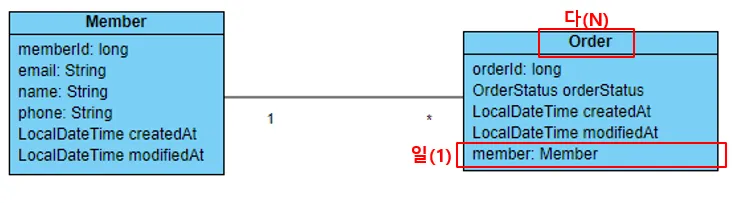
- many to one
- a
Membercan have multipleOrders
- a
- unidirectional
- only the
Orderclass holds a reference to theMemberobject
- only the
- naturally mirrors the database table structure
- as the
ORDERStable holds a foreign key (member_id) to theMEMBERtable, theOrderclass holds a reference to theMemberobject as if it were a foreign key
- as the
- Because this object structure aligns so well with the underlying table relationship, many-to-one unidirectional mapping is the most fundamental and commonly used relationship mapping in JPA.
⭐Example: N:N(1:N & N:1) + Bidirectional
Overview
This is bidirectional &
N:N, made out of1:N(member) andN:1(Order)
Order
@NoArgsConstructor
@Getter
@Setter
@Entity(name = "ORDERS")
public class Order {
    @Id
    @GeneratedValue(strategy = GenerationType.IDENTITY)
    private Long orderId;

    @Enumerated(EnumType.STRING)
    private OrderStatus orderStatus = OrderStatus.ORDER_REQUEST;

    @Column(nullable = false)
    private LocalDateTime createdAt = LocalDateTime.now();

    @Column(nullable = false, name = "LAST_MODIFIED_AT")
    private LocalDateTime modifiedAt = LocalDateTime.now();


    @ManyToOne   // (1)
    @JoinColumn(name = "MEMBER_ID")  // (2)
    private Member member;

    public void addMember(Member member) {
        this.member = member;
    }

    public enum OrderStatus {
        ORDER_REQUEST(1, "주문 요청"),
        ORDER_CONFIRM(2, "주문 확정"),
        ORDER_COMPLETE(3, "주문 완료"),
        ORDER_CANCEL(4, "주문 취소");

        @Getter
        private int stepNumber;

        @Getter
        private String stepDescription;

        OrderStatus(int stepNumber, String stepDescription) {
            this.stepNumber = stepNumber;
            this.stepDescription = stepDescription;
        }
    }
}
@ManyToOne- Tells “Many
Orderentities can be associated with oneMemberentity”
- Tells “Many
@JoinColumn- specifies the foreign key column in the database
- basically
Memberhasprivate List<Order> orders- 1:N / 일대다Orderhasprivate Member member- N:1/다대일- We created a bidirectional relationship

Member
@NoArgsConstructor
@Getter
@Setter
@Entity
public class Member {
    @Id
    @GeneratedValue(strategy = GenerationType.IDENTITY)
    private Long memberId;

    @Column(nullable = false, updatable = false, unique = true)
    private String email;

    @Column(length = 100, nullable = false)
    private String name;

    @Column(length = 13, nullable = false, unique = true)
    private String phone;

    @Column(nullable = false)
    private LocalDateTime createdAt = LocalDateTime.now();

    @Column(nullable = false, name = "LAST_MODIFIED_AT")
    private LocalDateTime modifiedAt = LocalDateTime.now();

	// (1)
    @OneToMany(mappedBy = "member")
    private List<Order> orders = new ArrayList<>();

    public Member(String email) {
        this.email = email;
    }

    public Member(String email, String name, String phone) {
        this.email = email;
        this.name = name;
        this.phone = phone;
    }

    public void addOrder(Order order) {
        orders.add(order);
    }
}OneToMany- defines a one-to-many relationship ⇒ “One
Membercan be related to manyOrders”
- defines a one-to-many relationship ⇒ “One
@OneToMany(mappedBy = "member")- Why
- If we don’t have this, it would be Many To One Unidirectional relationship, with only
OrderreferencingMember - From the member’s perspective, they should be able to see a list of their own orders
- If we don’t have this, it would be Many To One Unidirectional relationship, with only
mappedBy(mandatory)@ManyToOne+@OneToMany- most common and standard way to create a bidirectional relationship in JPA
- On the
@OneToManyside (the “one” side, e.g.,Member), themappedByvalue is always the name of the field on the@ManyToOneside (the “many” side, e.g.,Order). - You use
@ManyToOneto create the essential, foreign-key-based relationship, and then you add@OneToManyto make that same relationship conveniently accessible from the other direction
- specifies the field that “owns” the relationship
- the
Orderis the “owner” because its table (ORDERS) contains the foreign key (MEMBER_ID) ⇒ The “Many” side is always the owner Order.memberfield is the owner, theMember.orderslist is the non-owning (inverse) side- “Hey JPA, this is not a new relationship. Just use the one that is already defined by the
memberfield in theOrderclass.”
- the
- think of it this way
- 참조객체의 외래키의 역할을 하는 필드
- Order 의 외래키 역할을 하는건
member임
- Order 의 외래키 역할을 하는건
- member의 기본키 == order의 외래키
- 외래키가 여러개일수 있으니, 참조객체의 필드 중 어떤 필드가 나를 참조하는지
- 참조객체의 외래키의 역할을 하는 필드
- Why
Saving data to the actual tables
@Configuration
public class JpaManyToOneBiDirectionConfig {
    private EntityManager em;
    private EntityTransaction tx;

    @Bean
    public CommandLineRunner testJpaManyToOneRunner(EntityManagerFactory emFactory) {
        this.em = emFactory.createEntityManager();
        this.tx = em.getTransaction();

        return args -> {
            mappingManyToOneBiDirection();
        };
    }

    private void mappingManyToOneBiDirection() {
        tx.begin();
        Member member = new Member("hgd@gmail.com", "Hong Gil Dong",
                "010-1111-1111");
        Order order = new Order();

        member.addOrder(order); // (1)
        order.addMember(member); // (2)

        em.persist(member);   // (3)
        em.persist(order);    // (4)

        tx.commit();

				// (5)
        Member findMember = em.find(Member.class, 1L);

        // (6) 이제 주문한 회원의 회원 정보를 통해 주문 정보를 가져올 수 있다.
        findMember
                .getOrders()
                .stream()
                .forEach(findOrder -> {
                    System.out.println("findOrder: " +
                            findOrder.getOrderId() + ", "
                            + findOrder.getOrderStatus());
                });
    }
}
To place an order, you first need member information.
member.addOrder(order);- add the
orderobject to thememberobject’s list of orders- Even if you skip this step, the member and order information will still be saved correctly in the database tables (because the “owner” side of the relationship dictates the foreign key).
- However, if you don’t add the
orderto themember’s list and then retrieve thatmemberobject withfind()later in the same transaction (as in step 5), you won’t be able to access the order via object graph traversal.- This is because the
find()method retrieves thememberobject from the 1st-level cache, and the cached object you’re retrieving is the same instance that never had theorderadded to its list.
- This is because the
- add the
- add the
memberobject to theorderobject.- This step is mandatory. As we saw with the many-to-one relationship, the
memberfield on theorderobject acts as the foreign key. - If you forget to add the
memberto theorder, theMEMBER_IDcolumn for that order in theORDERStable will benull, as there is no object reference to establish the foreign key.
- This step is mandatory. As we saw with the many-to-one relationship, the
- Save the member information.
- Save the order information.
- Retrieve the member information you just saved (which will be fetched from the 1st-level cache).
- Because you’ve mapped a bidirectional relationship (and correctly set both sides of it in the code), you can now use object graph traversal to access the
List<Order>from thememberobject you just retrieved.
In the database table
When designing database tables, the standard approach is to resolve a many-to-many relationship by adding an intermediate table (also known as a join table) to create two separate one-to-many relationships.

- Ultimately, mapping a many-to-many relationship is just a process of connecting two one-to-many relationships.
Owner of the Relationship
Overview
In a bidirectional relationship, you must specify which side manages the foreign key (FK). This side is called the owner of the relationship.
- The entity whose table contains the FK is the owner
- Only the owner can modify the FK value, and db updates are based ONLY on the state of the owner!
- JPA must have a clear way to know where the foreign key is located
@Entity
public class Member {
    @Id @GeneratedValue
    private Long id;

    @OneToMany(mappedBy = "member") // Order의 member가 FK를 가진 주인
    private List<Order> orders = new ArrayList<>();
}

@Entity //<<<<<<<<<<<<<<<<<<<< OWNER <<<<<<<<<<<<<<<<<<<<<
public class Order {
    @Id @GeneratedValue
    private Long id;

    @ManyToOne
    @JoinColumn(name = "member_id") // 외래키 관리
    private Member member;
}
Member member = new Member();
Order order = new Order();
member.getOrders().add(order); // Does NOT affect the database ❌
order.setMember(member); // DOES affect the database ✅- Adding to the
orderslist of the non-owner (Member) will not be reflected in the database. - You must set the
memberfield of the owner (Order) for the change to be reflected in the database. Order= owner@ManyToOne- When you call
order.setMember(member);, you are directly telling JPA, “Set the value of theMEMBER_IDforeign key column for this order.” JPA can translate this into a clear SQLUPDATEorINSERTstatement. - When you fetch an
Order, JPA automatically uses the foreign key ofMember memberto retrieve the fullMemberentity for you
Member@OneToMany(mappedBy)- The
Memberentity has the fieldprivate List<Order> orders;, which is marked with@OneToMany(mappedBy = "member"). - The
mappedByattribute essentially tells JPA: “This list is just a convenient, in-memory mirror. Do not use this side to update the database. The real relationship is managed by thememberfield in theOrderclass.” - Because JPA is instructed to ignore the non-owner side for database updates, adding an order to the member’s list (
member.getOrders().add(order);) doesn’t generate any SQL to update the foreign key. Only changes to the owner side matter for persistence.
Convenience method (편의 메서드)
Overview
A convenience method is a helper method you add to your entity class to correctly and safely manage a bidirectional relationship in a single step.
When working with a bidirectional relationship (e.g., between Member and Order), you must set both sides of the relationship in your code to keep your Java objects consistent.
// Inside the Member.java class
public class Member {
    // ...
    @OneToMany(mappedBy = "member")
    private List<Order> orders = new ArrayList<>();

    // This is the convenience method
    public void addOrder(Order order) {
        this.orders.add(order);  // 1. Add the order to this member's list of orders.
        order.setMember(this);   // 2. Set the member on the order (the other side).
    }
}
How to Use It
Now, you can manage the relationship with a single, safe method call, which prevents mistakes and makes your code cleaner.
// The clean and safe way
Order order = new Order();
Member member = new Member();

member.addOrder(order); // This one line handles everything!
Recommended Practices for Relationship Mapping
- Avoid using one-to-many unidirectional mapping by itself because the entity that should correspond to the foreign key does not have the object reference
- Always start by applying a many-to-one unidirectional mapping first.
- Only add a bidirectional mapping if the initial unidirectional mapping doesn’t allow for the object graph traversal you need.
- For bidirectional relationships, write convenience methods to ensure both sides of the relationship are set correctly.
Key Points
- Spring Data JDBC only supports unidirectional mapping, but JPA supports both unidirectional and bidirectional mapping.
- JPA supports one-to-many (1:N), many-to-one (N:1), many-to-many (N:N), and one-to-one (1:1) relationships.
- The
@ManyToOneannotation is used on the “many” side of a relationship.- The
@JoinColumnannotation is used with@ManyToOne. Itsnameattribute specifies the name of the column that will store the foreign key.
- The
- The
@OneToManyannotation is used on the “one” side to make a relationship bidirectional. ItsmappedByattribute is set to the name of the field in the other entity that manages the relationship. - A many-to-many relationship is mapped by first applying two many-to-one unidirectional mappings and then making them bidirectional if necessary.
- A one-to-one relationship is mapped the same way as a many-to-one relationship (both uni- and bidirectional), just using the
@OneToOneannotation instead. - 엔티티 클래스의 연관 관계에 대해서 더 알아보고 싶다면 아래 링크를 참고하세요.
- JPA에서 FETCH가 무엇이고, FETCH 방식에는 어떤 것이 있는지 알아보고 싶다면 아래 링크를 참고하세요.
- JPA에서 CASCADE가 무엇인지 알아보고 싶다면 아래 링크를 참고하세요.
MessageAttachments notes
Why Many-to-Many?
- One message can have many attachments (a message can have multiple files)
- One attachment can be in many messages (the same file can be shared across different messages) That’s a many-to-many relationship!
What are those attributes?
The @JoinTable annotation tells JPA how to create the “bridge table” that connects messages and attachments.
@ManyToMany
@JoinTable(
    name = "message_attachments",
    joinColumns = @JoinColumn(name = "message_id"), // current entity
    inverseJoinColumns = @JoinColumn(name = "attachment_id") // refers to the other entity
)
private List<BinaryContent> attachments;joinColumns- This refers to the entity you’re currently in. Since you’re writing this annotation in the
Messageclass,joinColumnsrefers to the Message side. - means: “In the bridge table, the column that points to THIS message should be called
message_id”
- This refers to the entity you’re currently in. Since you’re writing this annotation in the
inverseJoinColumns- This refers to the other entity (the “inverse” side). Since you’re in
Message, the inverse isBinaryContent. - means: “In the bridge table, the column that points to the BinaryContent should be called
attachment_id”
- This refers to the other entity (the “inverse” side). Since you’re in
Visual Example
Your bridge table ends up looking like this:
message_attachments table:
┌─────────────┬───────────────┐
│ message_id  │ attachment_id │
├─────────────┼───────────────┤
│ msg-123     │ file-456      │  ← Message msg-123 has attachment file-456
│ msg-123     │ file-789      │  ← Message msg-123 also has attachment file-789
│ msg-999     │ file-456      │  ← Message msg-999 also uses file-456 (shared!)
└─────────────┴───────────────┘