- VERY IMPORTANT!! << you should know
JOINVERY WELL join- creates a virtual table
- https://calm-individual-12a.notion.site/JOIN-230c6b7098288180b6b9fbf34dfda774
ANSI Standard Joins
- Explicit join syntax using
JOIN ... ON ... - Replaces older implicit joins using
WHERE - ✅ Improves readability and maintainability
- 💡 Adopted in SQL-92 standard and now widely used
| Join Type | Description |
|---|---|
INNER JOIN | Includes only the matching rows between the two tables in the result. |
LEFT OUTER JOIN | Includes all rows from the left table; for the right table, it shows matching values or NULL if there is no match. |
RIGHT OUTER JOIN | Includes all rows from the right table; for the left table, it shows matching values or NULL if there is no match. |
FULL OUTER JOIN | Includes all rows from both tables; uses NULL where there are no matches.- not that much used |
SELECT column_list
FROM table1
[INNER | LEFT OUTER | RIGHT OUTER | FULL OUTER] JOIN table2
ON table1.key_column = table2.key_column;
INNER JOIN
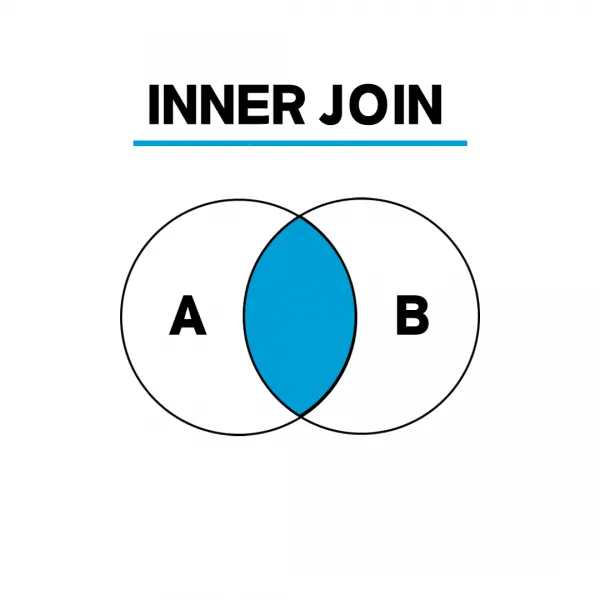
- An intersection
- Non-intersecting items are not included
- The default
JOIN=INNER JOIN
- BOTH HAS MATCHING DATA
-- 회원과 주문 테이블을 INNER JOIN하여 회원 이름과 주문 날짜를 조회
SELECT u.name, s.status
FROM User u
JOIN UserStatus s ON u.id = s.user_id| User Name | Status |
|---|---|
| Alice | Online |
| Bob | Offline |
| (Charlie is excluded - no status record) |
OUTER JOIN
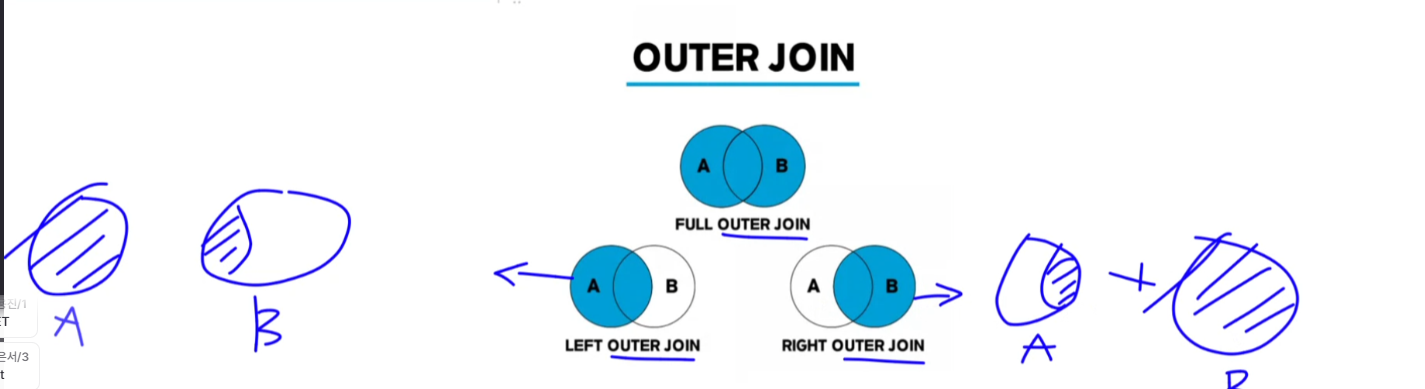
LEFT OUTER JOIN
- Rule: Show ALL rows from the left table, even if right table has no match
SELECT u.name, s.status
FROM User u
LEFT JOIN UserStatus s ON u.id = s.user_id
| User Name | Status |
|---|---|
| Alice | Online |
| Bob | Offline |
| Charlie | NULL |
Skipping through tables
-- 모든 회원 (이름, 상품명)이 주문한 상품명 조회, 주문내역이 없는 회원도 조회
SELECT m.name, m.age, p.name
FROM members m
LEFT JOIN orders o ON m.member_id = o.member_id
LEFT JOIN order_items oi ON o.order_id = oi.order_id
LEFT JOIN products p ON oi.product_id = p.product_id
RIGHT OUTER JOIN
- Show ALL rows from the right table, even if left table has no match (Rarely used - just flip tables and use LEFT JOIN instead)
SELECT m.name, o.order_date
FROM members m
RIGHT OUTER JOIN orders o ON m.member_id = o.member_id;- This query includes data based on the orders table, even if there is no corresponding member information (which would be an unusual case).
LEFT JOINis used more often, but this is used when you want to view the data based on the right-side table.
JOIN example (N:M)
- many-to-many relationship
- You can’t directly connect an
orderstable and aproductstable because:- One order can contain many different products.
- One product can be part of many different orders.
- The Solution: The Junction Table
- The
order_itemstable is a junction table (or join table). Its only job is to create a link between a specific order and a specific product. - It contains
order_idto link to theorderstable. - It contains
product_idto link to theproductstable. - It can also hold extra information about that specific link, like
quantity.
- The
CREATE TABLE order_items (
    order_id INTEGER,                                -- 주문 ID
    product_id INTEGER,                              -- 상품 ID
    quantity INTEGER NOT NULL DEFAULT 1,             -- 주문 수량
    PRIMARY KEY (order_id, product_id),
    FOREIGN KEY (order_id) REFERENCES orders(order_id),
    FOREIGN KEY (product_id) REFERENCES products(product_id)
);

-- 회원 1~5번이 주문한 상품 연결
INSERT INTO order_items (order_id, product_id, quantity)
VALUES
  (1, 1, 2),    -- 김철수 → 노트북 2대
  (1, 2, 1),    -- 김철수 → 스마트폰
  (2, 3, 1),    -- 이영희 → 태블릿
  (3, 4, 3),    -- 박지민 → 이어폰
  (4, 5, 1),    -- 최유나 → 모니터
  (5, 1, 1),    -- 정우성 → 노트북
  (5, 6, 1);    -- 정우성 → 키보드

SELECT m.name AS member_name,
       o.order_date,
       p.name AS product_name,
       oi.quantity
FROM members m
JOIN orders o ON m.member_id = o.member_id
JOIN order_items oi ON o.order_id = oi.order_id
JOIN products p ON oi.product_id = p.product_id;