- Database Transaction
- Always think
- What is the database doing in a transaction?
Atomicity
Overview
- All queries in a transaction must succeed → If one query fails for any reason, all prior successful queries in the transaction should rollback
- Lack of atomicity leads inconsistencies!
- An atom cannot be split
- So even if there are 100 queries that were successful, if 1 fails then it should rollback
- Scenario: What if the db goes down during my transaction? (not an actual explicit failure by the user)
- If it’s before a
COMMITof a transaction- All successful queries in the transactions should rollback
- When the database restarts, it will check its transaction log. It will see the transaction was started but never committed. Therefore, it will automatically rollback (undo) any changes made by that transaction to ensure the database is in a consistent state.
- If it’s after a
COMMITof a transaction- Once a
COMMITis successfully executed, the transaction’s changes are considered permanent and durable
- Once a
- If it’s before a
- You have to understand how dbs work differently (it all depends)
- Write-Ahead Log (WAL) - common for high performance systems
- Databases write changes to a log file on disk as the transaction progresses, before you type
COMMIT. This log entry contains the “before” and “after” data. - When you execute
COMMIT, the only thing that must happen for the commit to be successful is for a final “commit” record to be written to that log file on disk. - This makes the
COMMIToperation itself extremely fast. - Later, a background process takes the changes recorded in the log and applies them to the main database files on disk.
- Databases write changes to a log file on disk as the transaction progresses, before you type
- Other DBs store everything in memory, and the moment you
COMMITeverything in memory flushes to disk → commit will be slow, but rollback will be fast
- Write-Ahead Log (WAL) - common for high performance systems
Consistency
Overview
Consistency has two main meanings:
- In ACID (🏦), it’s a guarantee that a transaction will not violate the database’s internal rules (like constraints and foreign keys), ensuring the data is always valid
- Indistributed systems (🌐), it means all replicas of the data are synchronized, so every client sees the same, most recent information.
Consistency in data (Data validity)
- It’s a guarantee that your data will always be in a valid state according to the rules you define
- Represents the state of the data that is currently persisted.
- Is what you actually have in disk consistent with the data modeling that you have?
- This is the official “C” in ACID.
- Who defines the rules?
- Defined by the user (whoever builds out the data model)
- What are these rules?
- Constraints:
NOT NULL,UNIQUE,CHECK(e.g.,balance >= 0). - Referential Integrity: A foreign key in one table must point to an existing primary key in another. You can’t have an
orderfor acustomer_idthat doesn’t exist. - Business Logic: Any complex rule your application requires (e.g., in a bank transfer, the total amount of money must be the same before and after the transaction).
- Constraints:
- Atomicity, Isolation also ensures consistency
- Example of inconsistency
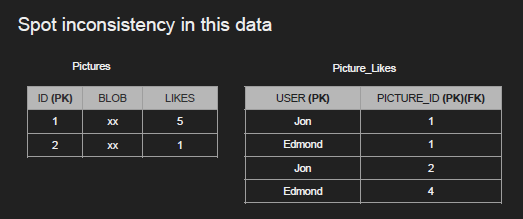
Consistency in reads (Data freshness)
- It’s about whether all clients see the same data at the same time
- Your data might be consistent on disk, but the reading of the data is inconsistent because you have multiple instances and they are slightly out of sync
- usually discussed in the context of distributed systems (like databases with multiple replicas or copies)
- This is NOT the “C” in ACID. It’s the “C” in the CAP Theorem
- The Problem: You have a primary database in London and a read replica in Seoul. You update your profile name in London. If you immediately try to read your profile from the Seoul replica, you might see your old name for a few milliseconds because the update hasn’t arrived there yet.
- The State: For that brief moment, the system as a whole is inconsistent—different parts of the system are giving different answers. This is often called eventual consistency.
- Things to think about
- If a transaction committed a change, will a new transaction immediately see the change?
- Affects the system as a whole
- Relational and NoSQL dbs suffer from this
- Eventual consistency
Isolation
Overview
Isolation determines how transactions interact with each other and what level of visibility one transaction has into the changes made by another concurrent transaction.
- Goal: Prevent a set of “read phenomena,” which are undesirable side effects that can lead to data inconsistency.
- Can my inflight transaction see changes made by other transactions?
- Read phenomena - bad side effects (one of the most pain to debug)
Read Phenomena
Dirty Read - non committed
Occurs when a transaction reads data that has been modified by another transaction but has not yet been committed
- It could be committed/rolled back/crashed
- Anything that is “dirty” is not really fully flushed
- Example
- diagram
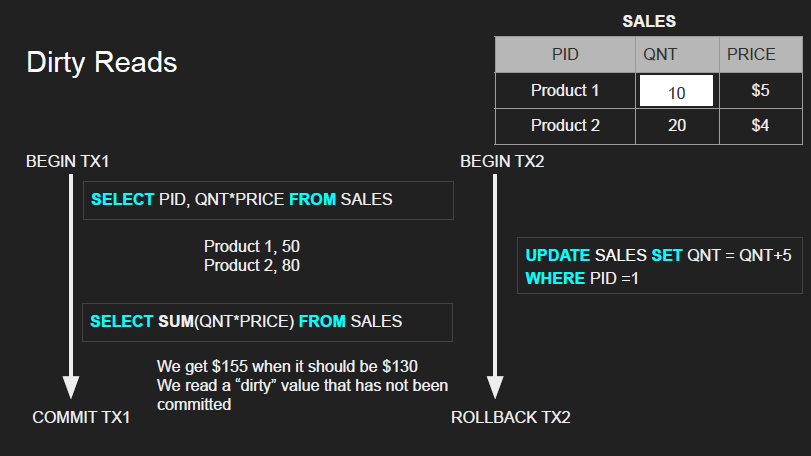
UPDATE SALES SET QNT = QNT + 5- We add 5 to QNT so 10 → 15, but it does a rollback after transaction (10→15→10) 1 does dirty read and commits lol
- So you did a dirty read but the read itself is rolled back which is even worse lol
- Within the same transaction, this would NOT be consistent
- diagram
Non-repeatable reads - actually committed read
Happens when a transaction reads the same row twice but gets different values each time
- occurs because another transaction committed an update to that specific row between your two reads
- The data you’re working with changes mid-transaction
- You actually READ A LOT without realizing
- Example
- diagram
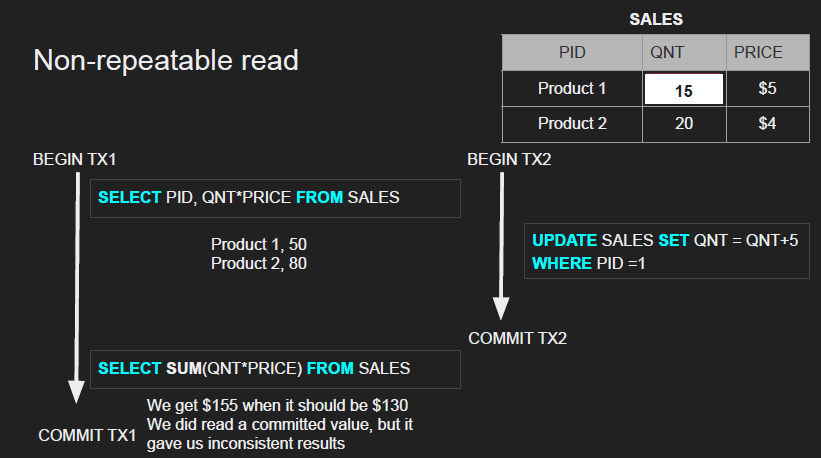
- So the 2nd transaction actually commits before the 2nd transaction commits (finishes) → NOT a dirty write, but a valid write
- You read the same values twice but got different results → inconsistency!
- Fixing this is expensive
- diagram
Phantom reads
Occurs when a transaction runs the same query twice but gets a different set of rows back the second time
- Caused by another transaction inserting or deleting rows that match the
WHEREclause of your query and then committing- Rows that didn’t exist before suddenly appear (phantoms), or existing rows vanish
- Example
- diagram
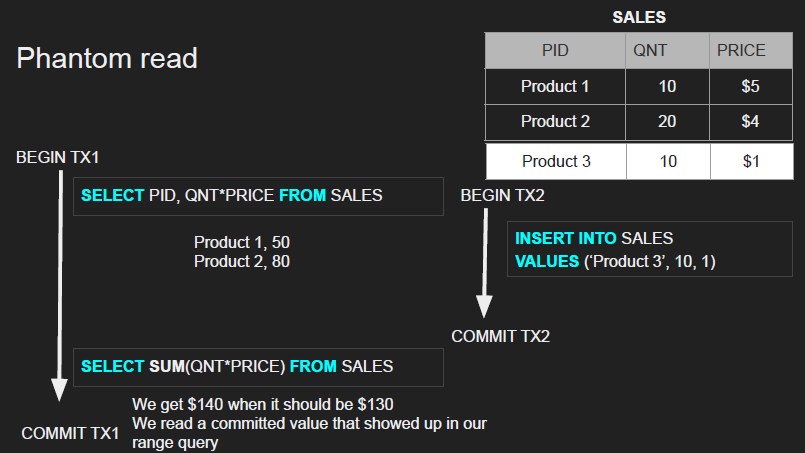
- Not a dirty read because we have read a committed value, and not a non-repeatable read the product didn’t really exist to begin with
- diagram
Lost updates
Occurs when two concurrent transactions read the same data, both modify it based on the value they read, and one of the updates is overwritten (or “lost”) by the other
- classic concurrency issue where the work of one transaction is silently erased by another
- the final state of the data doesn’t reflect the operations of both transactions
- final result reflects only one of two simultaneous updates
- Example
- diagram
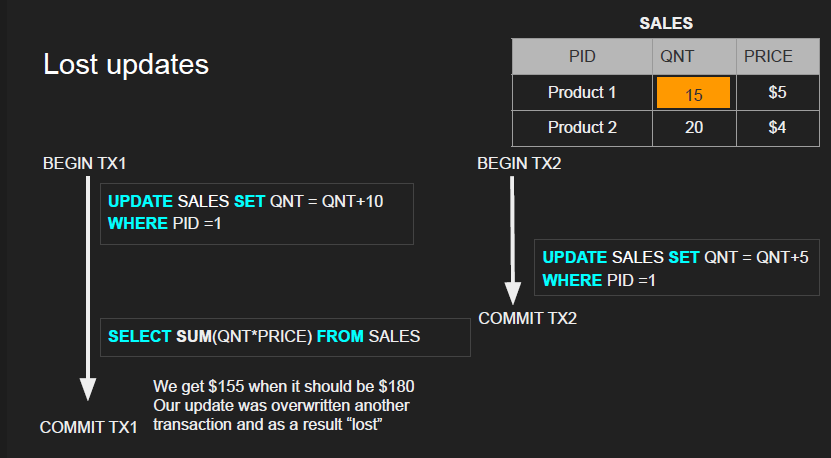
- The original quantity is 10
- Transaction 1 adds 10 so its 20, but Transaction 2 adds 5 so its 15 → 15 is overwritten
- So when T1 commits, its update was actually overwritten by another transaction
- diagram
Isolation levels for inflight transactions
- In-flight transaction
- Another name for an active or uncommitted transaction
- A transaction that has started (
BEGIN TRANSACTION) but has not yet finished with either aCOMMITor aROLLBACK
- You literally set these isolation levels as a developer
- A stricter level gives you more consistency but often at the cost of performance.
1. Read uncommitted
- This is the lowest level of isolation, essentially turning it off. Your transaction can see all changes from other transactions, even uncommitted, “dirty” ones.
- Basically NO ISOLATION lol
- Any change from the outside is visible to the transaction, committed or not
2. Read committed
- Each query in a transaction only sees committed changes by other transactions
- default level for many, many dbs
- Note: This is the default for many databases like PostgreSQL and SQL Server because it’s a good balance of performance and consistency.
3. Repeatable Read
- Your transaction is guaranteed to see the same data for any row it has read, no matter how many times it reads it
- when a query reads a row, that row will remain unchanged while its running.
- Analogy: You download a PDF of a report at the start of your work. You can refer back to that same PDF all day and its contents will never change, even if a newer version is published online.
- Allows (in theory): 👻 Phantom Reads.
- More on “How” section below
4. Serializable
- This is the strictest level. It guarantees that transactions will have the same effect as if they were run one after another, in a single “serial” line, with no overlap.
- No concurrency anymore → each transactions behave as if they were serialized after one another
- which one goes first is the question the database will answer
- Snapshot
- Each query in a transaction only sees changes that have been committed up to the start of the transaction. It’s like a snapshot version of the database at that moment.
- Note: This provides the highest data consistency but can significantly reduce concurrency and performance.
Read Phenomena VS Isolation levels
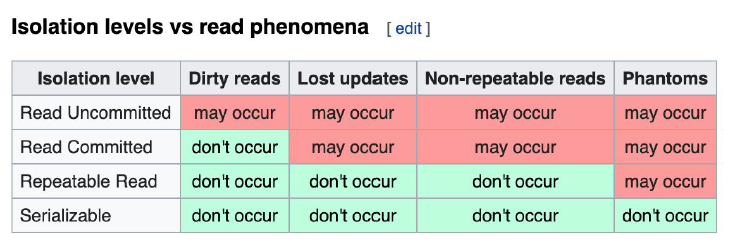
- Serializable and Snapshot
Database implementation of Isolation (The “How”)
- An isolation level is a promise (the “what”), and there are different strategies (the “how”) a database can use to keep that promise
- Each DBMS implements Isolation level differently
Pessimistic VS Optimistic Locking
- A database needs a strategy to enforce the rules described above. The two main approaches are:
- Pessimistic
- This strategy locks data to prevent conflicts before they happen. It’s “pessimistic” because it assumes that another transaction will likely try to modify the data at the same time
- How it works: When a transaction reads or writes data, the database places a lock (on a row, a page of rows, or a whole table). Other transactions must wait for the lock to be released.
- Row level locks, table locks, page locks
- common way to prevent lost updates
- Postgres implements RR as snapshot
- This is why you don’t get phantom reads with Postgres in repeatable read.
- Optimistic
- doesn’t use locks → assumes that conflicts are rare
- No locks, just track if things changed and fail the transaction if so
- Useful if the application has LOTS of reads and FEW updates
- How it works: The database gives a transaction a consistent view or “snapshot” of the data. When the transaction tries to
COMMIT, the database checks if another transaction has changed the data it was using. If so, it aborts your transaction and makes you retry. - Snapshot Isolation is the most common form of this.
- PostgreSQL example: Instead of locking, when a transaction begins in PostgreSQL, it takes a “snapshot” of the database at that moment 📸. Every query inside that transaction only sees data from that original snapshot.
- Other transactions can freely change data and
COMMIT; your transaction just won’t see their changes because it’s working off an old, consistent picture. - The Bonus (No Phantom Reads): This snapshot method is why PostgreSQL’s
REPEATABLE READlevel also prevents phantom reads. New rows inserted by other transactions don’t exist in your transaction’s original snapshot, so they can never appear.
- Pessimistic
Durability
Overview
The ability to the persist the changes when the transaction commits
- Changes made by committed transactions must be persisted in a durable non-volatile storage
- Anything we write is stored even if something happens (like a crash)
- If my computer crashes, when I come back the data still remains
- When it’s committed, I can shut off the power at that exact moment and when I come back my data will be there
- IDC where it’s stored
Durability techniques
- WAL - Write ahead log
- guarantees persistence
- If there is a crash, we can read all the WAL entries and rebuild the state
- Previously - Writing a lot of data to disk is expensive (indexes, data files, columns, rows, etc)
- This is why DBMSs persist a compressed version of the changes known as WAL (write ahead log segments) - it tells us what to change effectively
- AOF (Append only File)
- This is very similar to a WAL but is more common in databases like Redis.
- The Idea: The AOF logs every single write operation (e.g., the commands
SET key 'value',INCR counter) that modifies the data. - Crash Recovery: On restart, the database re-executes all the commands from the AOF from top to bottom, effectively rebuilding the entire dataset in memory.
- Asynchronous snapshots
- As we write we write everything to memory, but asynchronously on the background we snapshot everything to disk at once
- These guarantees we have a lightweight way of storing data
Biggest Challenge: OS Cache
- The Problem
- When an application (like a database) tells the operating system (OS) to write something to a file, the OS often cheats for performance. It writes the data to a cache in RAM first and reports “success” immediately. It plans to flush this cache to the physical disk later in a more efficient batch.
- The Risk
- If the power goes out after the OS reports success but before it has flushed the cache to the disk, that data is lost forever. This would violate the durability promise.
- The Solution
- Databases need to bypass this cache to guarantee durability → use a system command, commonly called
fsync(), which explicitly tells the OS: “Do not just write this to your cache. Force this data all the way to the physical disk right now and don’t report success until it’s done.”
- Databases need to bypass this cache to guarantee durability → use a system command, commonly called