| Aspect | Declarative Transaction (@Transactional) | Programmatic Method (TransactionTemplate) |
|---|---|---|
| Management Style | AOP-based automatic management | Explicit code-based management |
| Recommended Use Case | Recommended for the [[⭐Layered Architecture#@Service|Service layer]] | When complex flows or fine-tuning of the transaction is needed |
| Rollback Method | Automatic rollback on RuntimeException | Manual setting with setRollbackOnly() |
| Key Feature | Standard, excellent readability | Flexible, allows for detailed control |
Declarative Transaction (@Transactional)
Overview
In Spring, transactions are managed based on AOP (Aspect Oriented Programming). The most common method is to declare transactions using the
@Transactionalannotation.
- for
findmethods- Add
@Transaction(readOnly = True)
- Add
- Use only in Service Layer
- a standard practice based on the principle of separation of concerns
- Uses a proxy
Good and Bad
- Advantage
- Separates from business logic / concise code
- Easy to maintain
- standard approach
- no need to use
try, catchblocks
- Disadvantages
- Difficult to control complex transaction flows
- Doesn’t apply to internal method calls or
privatemethods
Scope
| Location of Application | Meaning |
|---|---|
| Class Level | Applies to all public methods within the class.- does NOT apply to private methods because AOP can only access public- Spring AOP and Transactions |
| Method Level | Applies only to the specific method (allows for the most granular control). |
Example Code
@Service
@RequiredArgsConstructor
@Transactional
public class UserService {
    private final UserRepository userRepository;
    private final EmailService emailService;

    @Transactional
    public void registerUser(User user) {
        userRepository.save(user);
        emailService.sendWelcomeEmail(user.getEmail());
    }

    @Transactional(readOnly = true)
    public User findUserById(Long id) {
        return userRepository.findById(id)
            .orElseThrow(() -> new UserNotFoundException(id));
    }
}
@Transactional(readOnly = true): Optimizes the transaction for read-only queries.- Automatically rolls back if an exception occurs.
- Automatically commits upon successful method completion.
rollbackFor and noRollbackFor
rollbackFor
- Spring automatically rollbacks for unchecked exceptions (ex
RuntimeException) - But maybe you also need to rollback a checked exception like
IOException
@Transactional
public void saveUserAndFile(User user, String content) throws IOException { // IOException is a checked exception
    userRepository.save(user); // Saves to DB
    fileWriter.write(content); // Might throw IOException
}- If
fileWriter.write()fails and throws anIOException, Spring’s default behavior would be to COMMIT the database transaction becauseIOExceptionis a checked exception.- This leaves your system in an inconsistent state
- Database: The new user record is saved and permanently committed.
- File System: The file is not written because the operation failed.
- This leaves your system in an inconsistent state
- you have to use
rollbackForto fix this
@Transactional(rollbackFor = IOException.class)
public void saveUserAndFile(User user, String content) throws IOException { // IOException is a checked exception
    userRepository.save(user); // Saves to DB
    fileWriter.write(content); // Might throw IOException
}
noRollbackFor
- When you want to commit the intermediate results anyway
- used for the rare case when a specific error occurs, but you do not want to roll back the transaction
// Our custom exception that might happen if the email server is down
public class WelcomeEmailFailedException extends RuntimeException { ... }

@Transactional(noRollbackFor = WelcomeEmailFailedException.class)
public void registerUser(User user) {
    userRepository.save(user); // 1. Save the new user to the DB
    emailService.sendWelcomeEmail(user.getEmail()); // 2. Try to send an email. This might throw WelcomeEmailFailedException
}- even tho email fails, the transaction will COMMIT and the new user will be saved in the db
- “the specific error is not serious enough to undo the main work”
@Transactional annotation
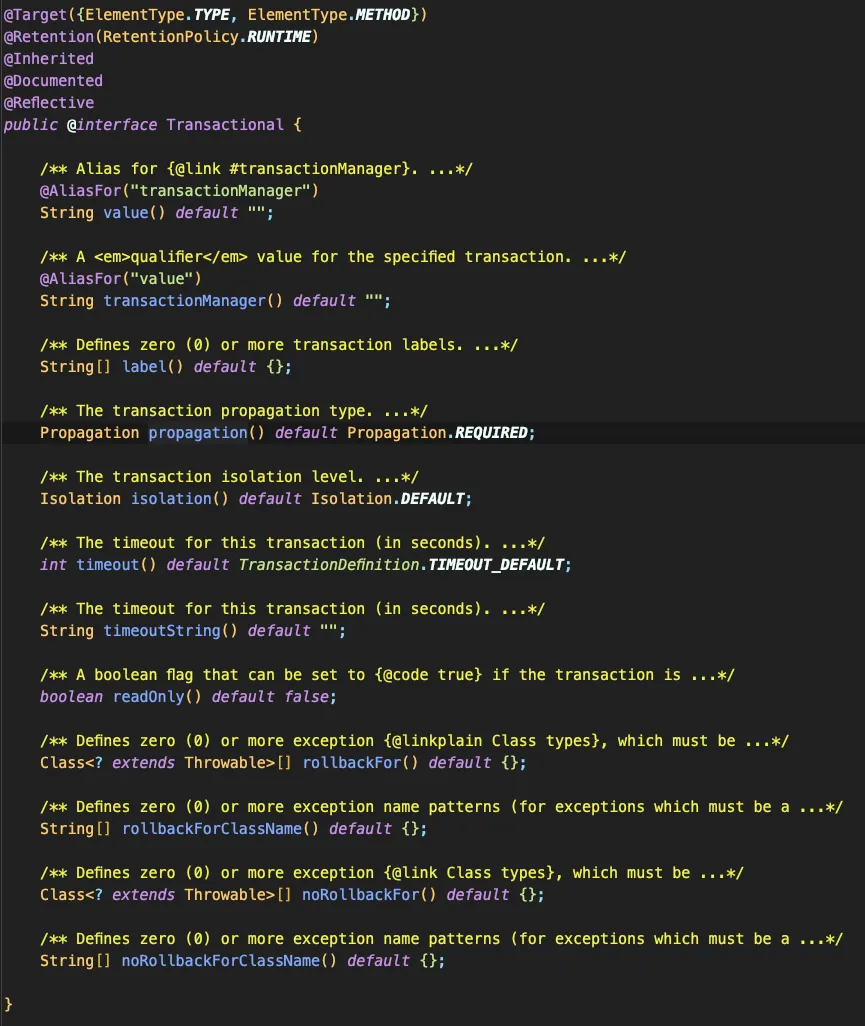
| Attribute | Description | Commonly Used Values |
|---|---|---|
propagation | The propagation behavior. | REQUIRED (default) |
isolation | The isolation level. - ACID - Isolation | DEFAULT |
timeout | The timeout duration (in seconds). | -1 (no limit) |
readOnly | Whether the transaction is read-only. | true / false |
rollbackFor | Exceptions that trigger a rollback. | Exception.class |
noRollbackFor | Exceptions that do not trigger a rollback. | DataIntegrityViolationException.class |
Programmatic Transaction
TransactionTemplate (using template)
- Programmatic transaction management provided by Spring.
- The transaction’s scope can be explicitly defined using lambdas and callbacks.
- Characteristic
- Rollback - Must be manually triggered using
status.setRollbackOnly() - Intended Use - Useful for complex flows and conditional rollbacks
- Rollback - Must be manually triggered using
Example
@Service
@RequiredArgsConstructor
public class OrderService {
    private final TransactionTemplate transactionTemplate;
    private final OrderRepository orderRepository;

    public Order createOrder(Order order) {
        return transactionTemplate.execute(status -> {
            try {
                Order savedOrder = orderRepository.save(order);
                boolean stockUpdated = updateStock(order);
                if (!stockUpdated) {
                    status.setRollbackOnly();
                    throw new InsufficientStockException();
                }
                return savedOrder;
            } catch (Exception e) {
                status.setRollbackOnly();
                throw e;
            }
        });
    }

    private boolean updateStock(Order order) {
        return true;
    }
}
PlatformTransactionManager (imperative/manual)
- The lowest-level transaction management API. The developer must manually call methods to start, commit, and rollback the transaction.
- It is necessary for handling complex flows, nested transactions, or when you need to use different transaction attributes within a single method.
Characteristics
- Fine-grained control (Propagation/isolation etc) - configured using a
TransactionDefinition - Rollback - must be explicitly called via
rollback(status) - Useful situations - for complex transactions or when
REQUIRES_NEWpropagation is needed
Example 1
@Service
public class ReportService {
    private final PlatformTransactionManager transactionManager;
    private final ReportRepository reportRepository;

    public Report generateLargeReport() {
        TransactionDefinition definition = new DefaultTransactionDefinition();
        TransactionStatus status = transactionManager.getTransaction(definition);
        try {
            Report report = new Report();
            report.setData(collectData());
            reportRepository.save(report);
            transactionManager.commit(status);
            return report;
        } catch (Exception e) {
            transactionManager.rollback(status);
            throw e;
        }
    }
}
Example 2 (long)
@Service
public class PaymentService {

    @Autowired
    private EntityManager entityManager;

    @Autowired
    private PlatformTransactionManager transactionManager;

    /**
     * 상품 결제 처리
     * - 수동 트랜잭션으로 명시적 상태 제어
     */
    public void processOrderPayment(Long orderId, Long itemId, int quantity, BigDecimal price) {
        TransactionStatus status = null;

        try {
            // 1️⃣ 트랜잭션 시작 (BEGIN)
            status = transactionManager.getTransaction(new DefaultTransactionDefinition());

            // 2️⃣ ACTIVE 상태 - 재고 차감 수행
            Query stockUpdate = entityManager.createQuery(
                "UPDATE Item i SET i.stock = i.stock - :quantity WHERE i.id = :itemId AND i.stock >= :quantity"
            );
            stockUpdate.setParameter("quantity", quantity);
            stockUpdate.setParameter("itemId", itemId);
            int updatedRows = stockUpdate.executeUpdate();

            if (updatedRows == 0) {
                // 재고 부족으로 트랜잭션 실패 유도
                throw new IllegalStateException("재고가 부족합니다.");
            }

            // 3️⃣ 외부 결제 서비스 호출 (ACTIVE 유지)
            boolean paymentSuccess = requestPaymentToPG(price);
            if (!paymentSuccess) {
                // 결제 실패 → 트랜잭션 실패 상태로 전환
                throw new RuntimeException("PG사 결제 실패");
            }

            // 4️⃣ 주문 상태 업데이트 (ACTIVE 상태 유지)
            Query updateOrder = entityManager.createQuery(
                "UPDATE Order o SET o.status = 'PAID' WHERE o.id = :orderId"
            );
            updateOrder.setParameter("orderId", orderId);
            updateOrder.executeUpdate();

            // 5️⃣ PARTIALLY COMMITTED 상태 - 모든 작업 성공
            transactionManager.commit(status); // COMMITTED 상태로 전환
            // 영구 반영 완료

        } catch (Exception e) {
            // 6️⃣ ABORTED 상태 - 예외 발생으로 롤백
            if (status != null) {
                transactionManager.rollback(status);
            }
            throw new RuntimeException("결제 트랜잭션 실패: " + e.getMessage(), e);
        }
    }

    /**
     * 외부 결제 시스템(PG) 호출 예시
     * @return 결제 성공 여부
     */
    private boolean requestPaymentToPG(BigDecimal price) {
        // 외부 PG사 결제 API 호출
        // 예제에서는 성공 가정
        return true;
    }
}
Comparison Chart
| Aspect | @Transactional | TransactionTemplate | PlatformTransactionManager |
|---|---|---|---|
| Management Style | AOP Proxy | Template (Lambda) | Direct Imperative API Calls |
| Code Complexity | Simple | Slightly Complex | Complex |
| Recommended Use Case | Standard for Service layer | When conditional rollback is needed | When complex transactions are needed |
| Rollback Method | Automatic on RuntimeException | setRollbackOnly() | Explicit rollback() call |
| Key Feature | Standard, simple | Clear within the code, flexible | Fully manual, fine-grained control |
Tips
| Situation | Recommended Method |
|---|---|
| General Business Logic | @Transactional |
| Conditional Rollback | TransactionTemplate |
Complex Transactions, REQUIRES_NEW, etc. | PlatformTransactionManager |
| Optimizing performance for simple read queries | @Transactional(readOnly = true) |
- AOP does NOT apply to internal method calls or
privatemethods.- This requires either separating the internal method into another class or restructuring the code to call it externally.