There are different parameters of your controller methods, used depending on the type of request
- Used in handler methods in controllers - ⭐Spring MVC
| Annotation | Description (what it handles) | How it Works | Example |
|---|---|---|---|
@RequestParam | Query / Form parameters | key=value | ?name=kim |
@PathVariable | URL path variable | /{id} | /members/1 |
@RequestHeader | Handles HTTP request headers | Header key | User-Agent |
@CookieValue | Handles HTTP cookie values | Cookie key | userToken |
@RequestBody | Handles the request body (JSON, XML, etc.) - a single, raw block of data, usually JSON or XML | Object binding | {"name" : "kim"} |
@ModelAttribute | Binds form data to an object. - Use this for simple form submissions with key-value pairs | Object property mapping | <form>..</form> |
@RequestPart | Used specifically for multipart/form-data requests, which are needed when you upload files along with other data | Part name mapping | profile=<file_data> |
@RequestParam
Binds a parameter from your web request’s URL query string to a method parameter in your controller
- This annotation is used on the server side to receive data that a client sends in the format of Query Parameters (also called a Query String), form-data, or x-www-form-urlencoded.
- automatically convert a comma-separated string from the URL into a
Listor array.
Core
At its core, @RequestParam extracts values from the query string (the part of a URL after the ?).
For a simple request like this: GET /api/search?keyword=spring boot:
@GetMapping("/search")
public String search(@RequestParam("keyword") String searchKeyword) {
    // Here, the variable 'searchKeyword' will have the value "spring boot"
    ...
}
How it Handles Lists
@GetMapping
public ResponseEntity<BinaryContentResponseDtos> getBinaryFiles(
    @RequestParam("ids") List<UUID> binaryContentUUIDList
) { ... }- Spring expects a request URL where the
idsparameter contains comma-separated values.- Example Request URL:
GET /binaryFile?ids=123e4567-e89b-12d3-a456-426614174000,789e0123-e45b-12d3-a456-426614174001
- Example Request URL:
@PathVariable
@GetMapping("/{member-id}")
public String getMember(@PathVariable("member-id") long memberId, Model model) {
	// 조회 (식별자).. 그래서 여기 path variable이 추가됨
	// 나중에 db에 따라서 long을 쓸지, string을 쓸지 달라짐
	System.out.println("memberId: " + memberId);
	model.addAttribute("memberId", memberId);
	return "memberDetail"; // templates/memberDetail.html
} - The string value provided inside the annotation’s parentheses must be identical to the string inside the curly braces
{}of the path mapping (e.g.,@GetMapping("/{member-id}")). - If the two strings are different (for instance,
@GetMapping("/{member-id}")and a parameter(@PathVariable("id") long memberId)), you will get aMissingPathVariableException.
@RequestHeader and @CookieValue
- HTTP requests typically include not only URL parameters or a request body, but also request headers and cookie information.
- contains details about the client’s (browser or app) state, environment, or authentication, which the server can use to provide a response tailored to the user’s environment
@RequestHeader - Controller Code
@GetMapping("/v1/members/header")
public String getUserAgent(@RequestHeader("User-Agent") String userAgent, Model model) {
    System.out.println("# User-Agent: " + userAgent);
    model.addAttribute("userAgent", userAgent);
    return "memberHeader"; // Renders templates/memberHeader.html
}User-Agentis just one of many fields inside an HTTP request header- Others include
Host,Accept,Authorization, etc. You’re just pulling out the value associated with theUser-Agentkey- To see different headers:
Chrome DevTools>NetworkTab > click on any request
- To see different headers:
Handling Cookie values
Creating a cookie on the server
@GetMapping("/v1/members/set-cookie")
public String setCookie(HttpServletResponse response) {
    // Create a new cookie
    Cookie cookie = new Cookie("userToken", "abc123xyz");

    // Set cookie properties
    cookie.setPath("/"); // Apply to all paths on the domain
    cookie.setHttpOnly(true); // Prevent access from JavaScript for security
    cookie.setMaxAge(60 * 60); // Expires in 1 hour

    // Add the cookie to the HTTP response
    response.addCookie(cookie);

    return "cookieSet"; // Renders templates/cookieSet.html
}- When a request is made to
/v1/members/set-cookie, the server creates a cookie nameduserTokenand sends it to the client. - The
Set-Cookieheader will be included in the server’s response.- Your browser (or Postman) automatically stores this cookie. For any future requests to the same domain, it automatically attaches the stored cookie to the request headers.
Reading the Cookie from the Client
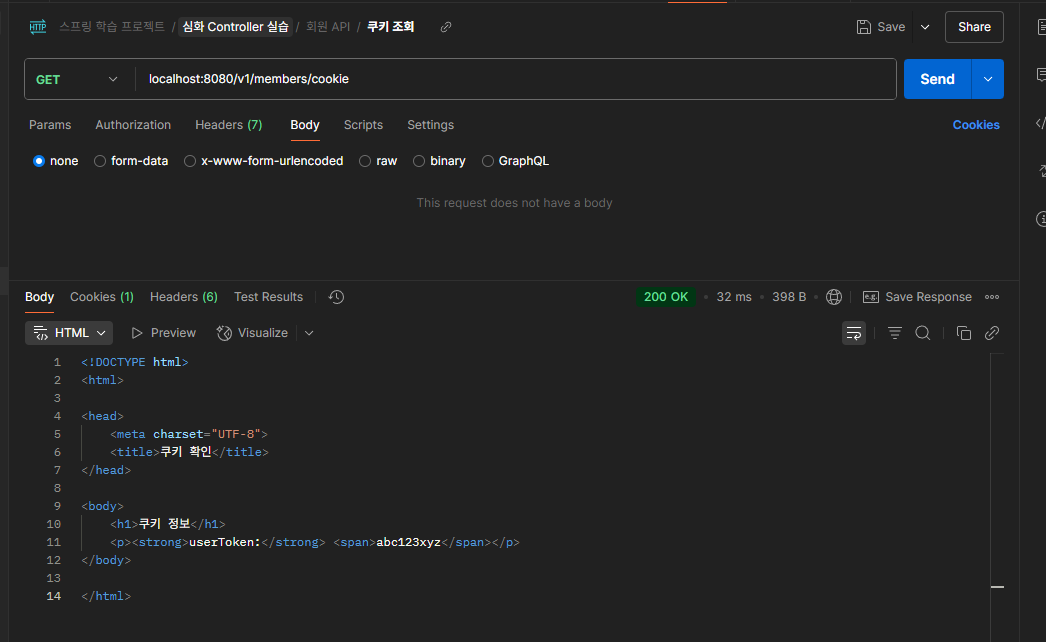
@GetMapping("/v1/members/cookie")
public String getCookieToken(@CookieValue("userToken") String token, Model model) {
    System.out.println("# userToken from client: " + token);
    model.addAttribute("token", token);
    return "memberCookie"; // Renders templates/memberCookie.html
}
(assume you alr have the html files)
Basically it will show like this when testing
@RequestBody
- Sending JSON data within the body of an HTTP request is a method commonly used in RESTful APIs and asynchronous communication (AJAX).
- a single, raw block of data, usually JSON or XML
- In ⭐Spring MVC, the
@RequestBodyannotation is used to automatically convert this incoming request data into a Java object. Content-Type:application/json,application/xml.
Example Request JSON
{
  "email": "test@example.com",
  "name": "홍길동",
  "phone": "010-1234-5678"
}
The DTO class
package com.springboot.member.dto;

public class MemberDto {
    private String email;
    private String name;
    private String phone;

    public String getEmail() {
        return email;
    }

    public void setEmail(String email) {
        this.email = email;
    }

    public String getName() {
        return name;
    }

    public void setName(String name) {
        this.name = name;
    }

    public String getPhone() {
        return phone;
    }

    public void setPhone(String phone) {
        this.phone = phone;
    }
}
Controller Code
@PostMapping(value = "/v1/members/json", consumes = "application/json")
public User createUser(@RequestBody UserCreateDto userCreateDto) {
  // Spring automatically maps the JSON to the UserCreateDto object
  return userService.create(userCreateDto);
}- Things to remember
- Must specify
Content-Type: application/jsonin your request headers when sending JSON data- Unlike a standard form submission (
application/x-www-form-urlencoded), the data is sent directly inside the HTTP Body as JSON.
- Unlike a standard form submission (
- The client must explicitly set the
Content-Typeheader toapplication/json. - For automatic data binding to work, the DTO class (the Java object you’re converting the JSON into) must have a default constructor and getters/setters.
- This is a requirement for the Jackson library (
ObjectMapper), which Spring uses behind the scenes.
- This is a requirement for the Jackson library (
- Must specify
- Testing w/ postman
- Method:
POST - URL:
http://localhost:8080/v1/members/json - Headers:
Content-Type:application/json
- Body:
- Select the
rawoption. - Choose
JSONfrom the dropdown menu. - Enter the JSON above
- Select the
- Method:
@ModelAttribute
- Receiving Form Data as an Object
- an annotation that automatically maps a client’s submitted form data to a Java object
- A key feature in Spring MVC is that even if
@ModelAttributeis omitted, form data from a POST request is automatically bound to the corresponding object parameter.- it’s optional
Controller code
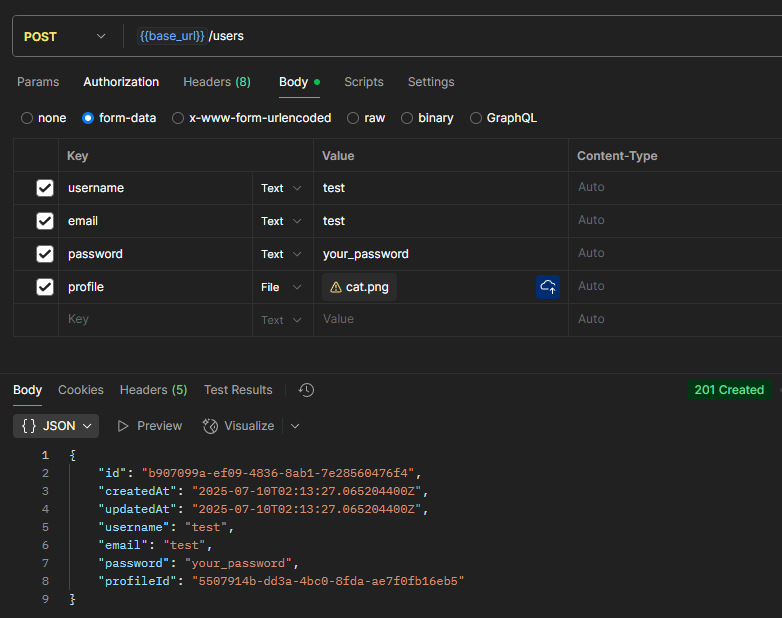
@PostMapping(consumes = MediaType.MULTIPART_FORM_DATA_VALUE)
public ResponseEntity<UserGetDto> createUser(
  @ModelAttribute UserCreateRequest userCreateRequest,
  @Parameter(description = "User 프로필 이미지")
  @RequestPart(value = "profile", required = false) MultipartFile profile
) {
UserGetDto user = userService.create(userCreateRequest, profile);

return ResponseEntity.status(HttpStatus.CREATED).body(user);
}
consumes = MediaType.MULTIPART_FORM_DATA_VALUE- optional, but recommended (clarity)
- The request must be
multipart/form-databecause you are combining file data (@RequestPart) with regular form data (@ModelAttribute)
- postman
@RequestPart
- This is a core Spring annotation used to handle
multipart/form-datarequests.- often used when you need to upload files along with other data in a single request
@PostMapping(consumes = {MediaType.MULTIPART_FORM_DATA_VALUE})  // <<<<<<<<< consumes
public ResponseEntity<UserGetDto> createUser(
  @Parameter(description = "User 생성 정보",
	  content = @Content(mediaType = MediaType.APPLICATION_JSON_VALUE))
  @RequestPart UserCreateRequest userCreateRequest,   // <<<<<<<<<<<<<<<<<<<<< HERE
  @Parameter(description = "User 프로필 이미지")
  @RequestPart(value = "profile", required = false) MultipartFile profile
) {
UserGetDto user = userService.create(userCreateRequest, profile);

return ResponseEntity.status(HttpStatus.CREATED).body(user);
}
@PostMapping(consumes = {MediaType.MULTIPART_FORM_DATA_VALUE})- Tells the Spring framework that this endpoint expects the request body to be formatted as
multipart/form-data
- Tells the Spring framework that this endpoint expects the request body to be formatted as
@RequestPart UserCreateRequest userCreateRequest- This tells Spring to take the part of the multipart request named
userCreateRequest(expected to be JSON) and convert it into aUserCreateRequestJava object - postman
- i forgot to screenshot, you have to put
Content-typeasapplication/jsonby unchecking the...on the right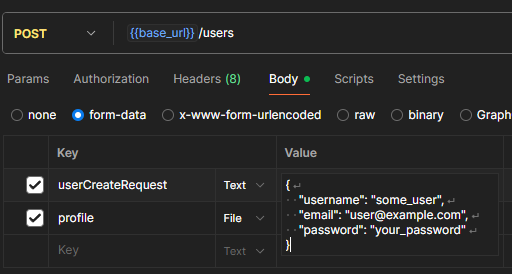
- i forgot to screenshot, you have to put
- This tells Spring to take the part of the multipart request named
@Parameter- It’s a swagger UI thing
consumes / produces
You can specify the format of data the server will accept from a request and the format it will use for its response.
consumes: Specifies the data type of the incoming request (e.g., what the server will accept).produces: Specifies the data type of the outgoing response (e.g., what the server will send back).
@PostMapping(value = "/v1/members",
             consumes = "application/json",
             produces = "application/json")
@ResponseBody
public MemberDto postMemberJson(@RequestBody MemberDto dto) {
    return dto;
}
Tips
- To prevent errors, it’s best to use annotations distinctly:
- use
@RequestBodyfor request bodies (like JSON) and@RequestParamor@ModelAttributefor query strings and form data.
- use
- You cannot use
@RequestBodyand@ModelAttributeat the same time for a single request- they are meant for different content types (e.g.,
application/jsonvs.application/x-www-form-urlencoded).
- they are meant for different content types (e.g.,
- For APIs that receive and return JSON, use
@RestController- it internally applies
@ResponseBodyto all methods, automatically handling JSON serialization.
- it internally applies
- The need to check or manipulate cookie and header information is very common in features like authentication (e.g., handling tokens), user activity tracking, and custom logging.
- Best Practices
The Core Difference
public ResponseEntity<?> download(BinaryContentDto.Response binaryContentDto) {
	Path path = resolvePath(binaryContentDto.id());

	if (!Files.exists(path)) {
	  return ResponseEntity.notFound().build();
	}

	//    File file = path.toFile();

	Resource resource = new FileSystemResource(path);
	MediaType contentType = MediaType.valueOf(binaryContentDto.contentType());
	String filename = binaryContentDto.fileName();

	HttpHeaders headers = new HttpHeaders();
	headers.setContentType(contentType);
	headers.setContentDisposition(
		ContentDisposition.builder("attachment").filename(filename).build());

	return ResponseEntity.ok()
		.headers(headers)
		.body(resource);

}
java.io.File
- What it is: A concrete class from standard Java that represents the path to a file or directory.
- What it does: It points to a location on the file system. That’s it. It has no concept of files inside a JAR, on a remote server, or anywhere else.
- The Limitation: Your code becomes tightly coupled to the file system. If you later need to get that same data from a URL or from inside your application’s resources, you have to rewrite your code.
Spring Resource
- What it is: A Spring-specific interface (a contract).
- an interface in Spring to represent an external resource
- provides several implementations for the Resource interface
FileSystemResource: A file on the hard drive (wraps aFile).- Represents a resource loaded from the filesystem
ClassPathResource: A file inside yoursrc/main/resourcesfolder (which gets bundled into your JAR).UrlResource: A file on a remote server accessed via URL.InputStreamResource: Data coming from any other kind of input stream.
- What it does: It provides a unified way to access the actual bytes of a resource, hiding the details of where that resource is located.
- The Power: Your code just deals with a
Resource, and it doesn’t care if that resource is:
Spring prefers Resource because it makes your code more flexible and decoupled from the storage mechanism. The code that downloads the file doesn’t need to know how it’s stored, it just needs to know how to get its content.
- Different Ways to Send a File as a Response in Spring Boot for a REST API
- Working with Resources in Spring
===
- To load a resource from a file system, we use the
fileprefix.
Spring repository JPA
https://www.baeldung.com/spring-data-jpa-pagination-sorting
public interface ProductRepository extends PagingAndSortingRepository<Product, Integer> {

    List<Product> findAllByPrice(double price, Pageable pageable);
}- By having it extend PagingAndSortingRepository, we get findAll(Pageable pageable) and findAll(Sort sort) methods for paging and sorting.
- we could have chosen to extend JpaRepository instead, as it extends PagingAndSortingRepository too.
- Once we extend PagingAndSortingRepository, we can add our own methods that take Pageable and Sort as parameters, like we did here with findAllByPrice.
MY CODE
Controller
@GetMapping
public ResponseEntity<PageDtoResponse<MessageDtoResponse>> getMessagesByChannel(
    @Parameter(description = "조회할 Channel ID")
    @RequestParam("channelId") UUID channelId,
    @RequestParam("page") int page,
    @RequestParam("size") int size
) {

  Sort sort = Sort.by(
      Sort.Order.desc("createdAt")
  );

  // 첫 번째 파라미터: 조회할 페이지 번호 (0부터 시작)
  // 두 번째 파라미터: 한 페이지에 보여줄 데이터 개수
  // 세 번째 파라미터: 정렬 기준과 방향을 지정하는 Sort 객체
  Pageable pageable = PageRequest.of(page, size, sort);

  PageDtoResponse<MessageDtoResponse> pageDto = messageService.findAllByChannelIdPage(channelId,
      pageable);

  return ResponseEntity.ok(pageDto);
}
Service
@Override
@Transactional(readOnly = true)
public PageDtoResponse<MessageDtoResponse> findAllByChannelIdPage(UUID channelId,
    Pageable pageable) {
  Page<Message> messagePage = messageRepository.findByChannel_Id(channelId, pageable);
  List<Message> messageList = messagePage.get().toList();

  return pageMapper.toPageDtoResponse(messagePage, messageList);
}
Repository
Page<Message> findByChannel_Id(UUID channelId, Pageable pageable);- implemented for us by JPA!!