Definition
- Spring MVC is a web framework based on the
spring-webmvcmodule.- It describes the specific roles and responsibilities within the top layer of the ⭐Layered Architecture (the Controller/Presentation Layer)
- The Spring MVC Web framework is included in the
spring-boot-starter-webdependency (Spring Boot Starter)
Traditional Method - Servlet
- Servlet
- a server-side web component provided in Java EE.
- extends the
HttpServletclass to handle requests, meaning developers had to work directly with HTTP request/response objects
@WebServlet("/hello")
public class HelloServlet extends HttpServlet {
    @Override
    protected void doGet(HttpServletRequest req, HttpServletResponse resp)
            throws ServletException, IOException {
        resp.setContentType("text/plain");
        resp.getWriter().write("Hello, Servlet!");
    }
}- Bad
- Developers must manually handle HTTP request/response objects → verbose code
- Hard to reuse or test → low maintainability
- Business logic and presentation are mixed together (poor Separation of Concerns)
Reasons to use
- Spring MVC is built on top of the Servlet API but designed to handle web requests in a more abstracted way.
- Its core component is the
DispatcherServlet. - Internally, Spring MVC still works with
HttpServletRequestandHttpServletResponse, but developers only need to interact with the abstracted APIs provided by Spring.
- Its core component is the
- Separation of Concern (SoC)
- The Default Web Pattern: Spring essentially mandates the use of MVC for web applications
- The
spring-boot-starter-webdependency automatically configures the entire MVC framework
- The
- Clear Division of Labor: It cleanly separates the application into distinct layers
- Model: Represents the data
- View (or Client): Renders the data (e.g., as JSON for a REST API)
- Controller: Manages user requests, calls the appropriate business logic, and returns the model
- Backend Standard: This separation is the most dominant and proven architectural pattern for backend development in general, not just in Spring
- The Default Web Pattern: Spring essentially mandates the use of MVC for web applications
- Enables Powerful & Efficient Testing
- Testing in Spring
- Independent layers are easy to test in isolation
- Easy mocking (“mocking” dependencies, like testing a controller’s logic without needing a real db or a service layer)
- Rapid feature validation and very fast test execution speeds
Diagram (w/ Layered Architecture)
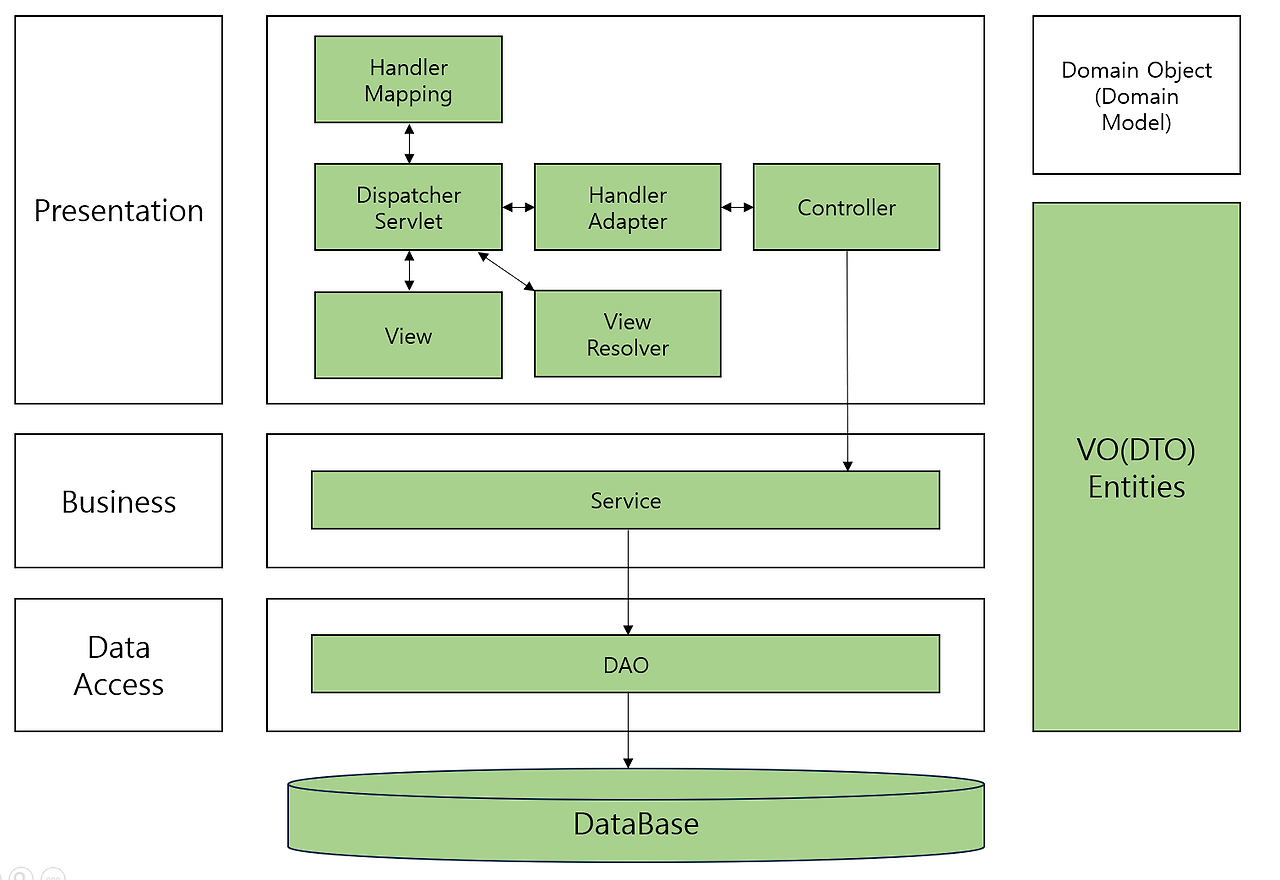
M-V-C (Main Roles)
These are the high-level, conceptual “job titles” in your application → They describe the what and the why.
Controller
- The Controller in MVC is the exact same thing as the Controller Layer (or Presentation Layer) in the ⭐Layered Architecture
- It is the entry point to your application’s backend logic.
- Receive incoming HTTP requests from the client.
- Process the request by calling the appropriate Service method.
- Return a response back to the client (Model)
- It is the entry point to your application’s backend logic.
- Using Data Transfer Object (DTO)
- We almost never return the database
Entitydirectly to the client but we use DTOs for all incoming and outgoing data (security + flexibility) - 과제 노트&자료정리
- We almost never return the database
- It’s role is to receive the
HttpServletRequestfrom theDispatcherServlet, call the appropriate method, and prepare the model and view for the response.
Example
@RestController
@RequestMapping("/v1/coffee")
public class CoffeeController {

    private final CoffeeService coffeeService;

    public CoffeeController(CoffeeService coffeeService) {
        this.coffeeService = coffeeService;
    }

    @GetMapping("/{coffee-id}")
    public Coffee getCoffee(@PathVariable("coffee-id") long coffeeId) {
        return coffeeService.findCoffee(coffeeId);
    }
}- The
Coffeeobject returned in the code above is passed to the View and is automatically converted into a JSON response. - Practical Tip
- The Controller must only return DTO or Entity objects.
@RestControlleris a combination of@Controller+@ResponseBody, and it is mainly used when returning JSON.
Model
- It is simply a container for data.
- the “package” that the Controller prepares to send to the View (usually JSON)
- Its only job is to hold the information that the
Controllerwants to show to the user. - It doesn’t do anything. It doesn’t have logic. It just holds stuff.
- In a REST API, the Java object you return from your controller (e.g.,
ProductDto) is the Model.- Spring uses
Jacksonto serialize theUserDto(Model) into a JSON string. - Spring sends this JSON string back across the internet inside an HTTP Response.
- Spring uses
- (NO overlap with the service layer)
View
- Simply what the user sees
- When it gets the Model (JSON) from the Controller
- The JavaScript code in the browser parses this JSON string, extracts the data (name, email, etc.), and uses it to render or update the HTML on the screen.
- Completely separate from SpringBoot, made from tools like React
- Two main ways to create it:
- Server-Side Rendering (Old)
- Your Spring Boot application generates the full HTML page on the server (using a template engine like Thymeleaf).
- The complete page is sent to the user’s browser.
- Pro: Great for SEO.
- Con: Can feel less interactive than a modern app.
- Client-Side Rendering (The New Way using SPAs)
- Your Spring Boot application acts as a REST API and only sends raw data (usually JSON).
- A Single Page Application (SPA), built with a library like React, runs in the user’s browser. It fetches the JSON data from your Spring backend and generates the HTML screen dynamically.
- SEO sucks for this tho
- next.js is meant to solve this
- Trend - JSON + a Single-Page Application (SPA) framework like React or Vue
- Server-Side Rendering (Old)
Types of Views
| Output Format | Description |
|---|---|
| HTML | Creates the screen using a View template (e.g., Thymeleaf, JSP). |
| JSON | A response containing data for the client to process (e.g., for SPAs, mobile apps). |
| Document | A response converted into a format like PDF or Excel. |
DispatcherServlet ⭐
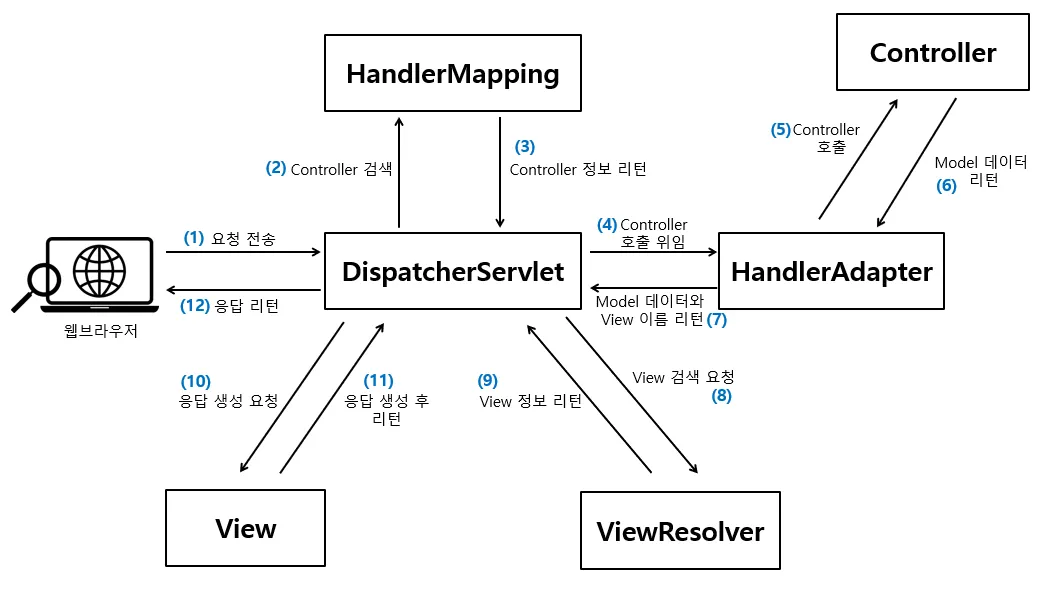
- Specific “tools” that the Spring MVC framework uses behind the scenes to run efficiently. You don’t usually interact with them directly.
- @RestController VS @Controller + 흐름 정리
- good refresher on my blog
DispatcherServlet
Definition
The core of the Spring MVC architecture and the entry point for all HTTP requests.
- It operates based on the Front Controller Pattern, receiving the client’s request and taking full responsibility for the subsequent processing flow.
- Read more in the context of Spring Servlet: Spring Servlet - DispatcherServlet
- The Front controller Pattern
- EVERYTHING PASSES THROUGH THIS
- Main roles
- Request Reception - It is the first component to receive all HTTP requests sent by the client.
- Handler Search Request - It delegates to the
HandlerMappingto find the Controller that will process the request. - Handler Execution Delegation - It delegates to the
HandlerAdapterto execute the Controller’s method. - Response Rendering Control - It receives the processing result (Model and View) and generates a response through the
ViewResolverandView.
- In practice, if a client request comes in with an incorrect URL or if there is no appropriate handler, a 404 error will occur. In this case, by setting the
DispatcherServlet’s log level to DEBUG, you can check how far the request progressed
HandlerMapping - Address Book
Role
HandlerMappingplays the role of connecting (mapping) a client’s request URI to the Controller method that will handle it.
- Implemented as key + value
- Purpose
- The
DispatcherServletthen ASKS theHandlerMapping(the Directory), “Hey, I have a letter addressed to/coffee/42with aGETmethod. Who does this go to?” - The
HandlerMapping(the Directory) does the lookup. It “analyzes” its internal list and finds the entry. - The
HandlerMappingthen tells theDispatcherServlet, “That letter belongs to thegetCoffeeById()method in theCoffeeController.”
- The
- Answers - “Which controller method handles this specific URL and HTTP method?”
- That’s it/ It’s just a directory or a map.
- Handler = Your Controller Method
- annotated with
@GetMapping,@PostMapping
- annotated with
- When your SpringBoot application starts up
HandlerMappingscans all classes annotated with@RestControlleror@Controller- It then builds a dictionary for methods with annotations like `@GetMapping(“/coffee/{id})
- This entry links the request details (the HTTP method
GETand the URL pattern/coffee/*) to a specific handler object (a reference to yourCoffeeController.getCoffeeByIdmethod)`
- This entry links the request details (the HTTP method
- When an actual HTTP request like
GET /coffee/42arrives at theDispatcherServlet, theDispatcherServletasks theHandlerMappinga simple question: “I have aGETrequest for/coffee/42. Which handler is registered for this?” - The
HandlerMappinglooks at its map, finds the match, and returns the handler object (theCoffeeController.getCoffeeByIdmethod) back to theDispatcherServlet.HandlerExecutionChain
Main Implementations and Characteristics
| Implementation | Description |
|---|---|
RequestMappingHandlerMapping | Annotation-based mapping. It analyzes annotations like @GetMapping and @PostMapping to store mapping information. Used in most Spring projects. |
SimpleUrlHandlerMapping | Used in XML-based configurations, it connects URLs and handlers within the bean configuration file. |
BeanNameUrlHandlerMapping | Automatically maps if the bean’s name is the same as the request URI. |
- In practice,
RequestMappingHandlerMappingis used in most cases. - If a mapping conflict or omission occurs, it is important to check the path configuration in
@RequestMappingor verify the URL spelling.
HandlerAdapter
Role
- It “adapts” the generic request into a specific call to your unique method signature. That’s its only job.
- Mapping VS Adapter
HandlerMappingfinds WHO should do the work.HandlerAdapterknows HOW to talk to them, get them to do the work, and bring back the result.- The bridge between
DispatcherServletandController
- After
HandlerMapping- Now the
DispatcherServletknows what method to call, but it doesn’t know how to call it.- Your method signature might be complex:
public CoffeeDto getCoffeeById(@PathVariable Long id, @RequestHeader("X-Source") String source). - The
DispatcherServletis not smart enough to pull"42"out of the URL, convert theString "42"into aLong 42, get the"X-Source"header value, etc
- Your method signature might be complex:
- Now the
- Now, the
HandlerAdapterknows exactly HOW to execute your specific handler method- Adapting the Inputs: It looks at the handler method the
DispatcherServletgives it & inspects the method’s parameters (@PathVariable,@RequestBody,@RequestParam, etc.).- It then takes the raw
HttpServletRequest, pulls out all the required information, converts it to the correct Java types (StringtoLong, JSON to a DTO object), and prepares the arguments for the method call.
- It then takes the raw
- Invoking the Method: It then uses this prepared list of arguments to actually invoke your controller method.
HandlerInterceptor- set of gatekeepers or checkpoints that you can place around your controller method
preHandle()- before the handlerpostHandle()- after the handlerafterCompletion()- after the response is sent
- set of gatekeepers or checkpoints that you can place around your controller method
HttpMessageConverterHandlerAdapteruses this in order to pass the correct object as the argument- only used after
preHandle()checkpoint passed
- Handling the Output:
- REST API
- Your method runs and returns a Java object (e.g., a
CoffeeDto). - The
HandlerAdaptertakes this return value and hands it back to theDispatcherServlet. - The DTO will get converted to JSON (using
HttpMessageConverter) - Usually used with
@RestController
- Your method runs and returns a Java object (e.g., a
- SSR method
- Your method runs and returns a
String(the view name) or aModelAndViewobject. - The
HandlerAdaptertakes this return value and hands it back to theDispatcherServlet. - The
ModelAndViewwill be used by theViewResolverto find and render an HTML template. - Usually used with
@Controller
- Your method runs and returns a
- REST API
- Adapting the Inputs: It looks at the handler method the
- In practice, if you use a custom handler, you must implement a
HandlerAdapteryourself and register it with Spring.
Response Processing Components (ViewResolver, HttpMessageConverter )
ViewResolver
- Relevant for SSR Application (NOT Rest API) - Your Spring Boot backend is responsible for generating the full HTML page and sending it to the browser
- A Controller usually returns only a View name (logical name of the view).
- Ex)
"home","coffee/list". - The
ViewResolver’s job is to find the actual JSP, Thymeleaf template file, etc., that corresponds to this name.
- Ex)
- Basically
- The
DispatcherServletasks theViewResolverto find the actualView(like a template file) using the view name it received. - The
ViewResolverfinds the correctViewobject and returns it. - The
DispatcherServletgives the Model data to thisViewobject and tells it to create the final response. - The
Viewgenerates the final data (like an HTML page) and sends it back to theDispatcherServlet, which then delivers it to the client.
- The
HttpMessageConverter
- Relevant for building a REST API (for React, Vue, etc)
- API responses return data directly as JSON, XML, etc., instead of a View.
- The component that serializes (or deserializes) a Java object for this purpose is the
HttpMessageConverter.
- The component that serializes (or deserializes) a Java object for this purpose is the
- Main Roles
- It converts the object returned from the Controller into the appropriate format for the HTTP Response Body.
- It can also reverse-convert (deserialize) the client’s request body into a Java object (for
@RequestBody). - It automatically selects the appropriate converter based on the
Content-Typeheader of the response.
- In practice, if a JSON serialization issue occurs, you should check the registration order of your
HttpMessageConverters and theObjectMapperconfiguration.
Basically
@RestController→ return value →HttpMessageConverter→ HTTP response body- return value is not treated as a view name. Instead, it’s passed directly into the
HttpMessageConverterchain, which serializes it (e.g., to JSON or XML) and writes it to the HTTP response body - view resolver phase is skipped
- The return value (Java object, String, collection, etc.) is transformed into the response body immediately via the appropriate
HttpMessageConverter - Depends on the return value actually
- If you return a
Stringfrom a@RestController, it will still be written as plain text to the response body, not treated as a template name. - If you return a Java object, it typically goes through
MappingJackson2HttpMessageConverter(for JSON) or another converter depending onAcceptheaders.
- If you return a
- return value is not treated as a view name. Instead, it’s passed directly into the
@Controller→ return value (view name) →ViewResolver→View→ rendered output@Controllermethod usually returns a view name. That string is then passed to the ViewResolver, which resolves it into aView(like a JSP, Thymeleaf template, etc.) to render the response
Main Implementations
| Implementation | Description |
|---|---|
MappingJackson2HttpMessageConverter | Converts between Java objects ↔ JSON (The default). |
StringHttpMessageConverter | Used when returning simple text. |
FormHttpMessageConverter | Handles application/x-www-form-urlencoded data. |
CSR vs SSR 😭
- https://calm-individual-12a.notion.site/21cc6b70982881baab5de14375de0875
- CSR - View 기반 (REST API) VS SSR - JSON 기반 흐름 비교
- 티스토리 블로그 @RestController vs @Controller 정리
| Feature | SSR Method (Server-Side Rendering) | REST API Method |
|---|---|---|
| Controller | Uses @Controller | Uses @RestController |
| Handler’s Responsibility (What your method must return) | Returns the View Name and Model data | Returns the Data Object (DTO) |
| Rendering | ViewResolver, View | HTTPMessageConverter |
HandlerAdapter’s Output (handed back to `DispatcherServlet) | A ModelAndView object | The raw DTO object |
| The result sent back to client | HTML screen (JSP, Thymeleaf) | JSON data |
Summary
- Everything is connected through
DispatcherServlet
| Component | Main Role | Practical Checkpoints |
|---|---|---|
DispatcherServlet | Orchestrates the entire request flow. | Request flow tracing, exception handling. |
HandlerMapping | Finds the handler for a request URI. | Duplicate or missing @RequestMapping. |
HandlerAdapter | Abstracts handler execution. | Ability to process custom handlers. |
ViewResolver | Converts a View name to an actual View. | Checking prefix/suffix settings. |
HttpMessageConverter | Converts between objects ↔ HTTP messages. | JSON serialization errors, Content-Type issues. |