Streams
- A flow of data between a program and its input/output
- you can redirect the output of a program into a file
Standard Streams: stdin, stdout, stderr
- It’s how a command can interact with the terminal
- By default, there are 3 communication channels for data
- file descriptors
- is a number that represents an input/output (I/O) stream
- Linux assigns numbers 0-2 to these streams
- diagram
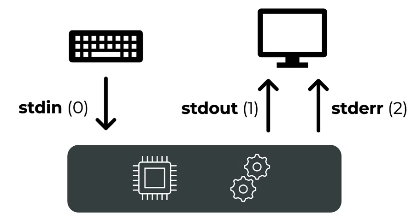
0: stdin: standard input- Default: Connected to keyboard
- If the program wants to access our keyboard, then it could start listening to the
stdin, then the program could receive input for our keyboard
1: stdout: standard output- Default: Connected to your screen/terminal
- The program wants to display something on the screen
- So everything our program outputs, it just sends it to the stream
stdout, then our terminal displays that in our terminal
2: stderr: standard error- Default: Also connected to your screen/terminal.
- when terminal wants to output errors
- by default this also gets printed to the screen
- file descriptors
Redirection operators
Redirection operators (
>,>>,<) are just instructions to change where the three channels above point.
Redirecting stdin (Input)
- You want a program to get its input from a file instead of the keyboard.
- Operators
<- Read From File: Connects
stdinto a file. ⇒ Rewire the input of the program to be the inputs from the right file - The program reads the file’s contents as if you typed it.
wc -l < file_list.txtwc -lcounts the lines fromfile_list.txtinstead of waiting for keyboard input
cat < hello.txtcatthe content & take the content as input fromhello.txt- shell open
hello.txt, take its contents, and set that to be the input of cat
- Read From File: Connects
Redirecting stdout
- These operators only redirect
stdoutto a file (doesn’t capturestderr)- By default,
stdout(standard output) is printed to the screen. - Redirection tells bash to send
stdoutto a file instead. - Adding/removing 1 to the operator doesn’t matter
- By default,
- Operators
>- Redirects an output directly into a file (overwrites)
- Redirects only
stdoutby default (doesn’t capturestderr) - overwrites file
echo 'hello' > test.txt- Creates new file if file doesn’t exist
- same with
echo 'hello' 1> test.txt
>>- Redirects stdout (appends to file)
- Combining
stdoutandstdincat < hello.txt > hello2.txtcat < hello.txt→ this givescathello> hello2.txt→catthen writes hello to hello2.txt
Redirecting stderr
- Some reasons to use this
- We may want to use this when we want to ignore errors (a program may print errors)
- We are only interested in the errors and want to redirect them into a file (to have a look at them at a later date)
- Operators
- If there are no errors, the file is emptied (for both operators)
2>2>>
Redirecting stdin AND stderr
- Just use them in one line
du -h test.txt not_existing.txt > output.txt 2> error.txt
- You can ignore the errors using
/dev/null- Redirect to a null device, a file we can open and write into it and it will be discarded by the operating system →
/dev/null
- Redirect to a null device, a file we can open and write into it and it will be discarded by the operating system →
Redirecting stderr to stdout
- It easily allows us to store both outputs in the same file
&1stands for currentstdout[command] 2>&1- we take our
stderrand redirect it to the currentstdout- both messages (
stdout, stderr) will be combined into the same output stream (which could be saved to a file or displayed on the screen)
- both messages (
- `du -h test.txt not_existing.txt 2>&1
- we take our
[command] > out.txt 2>&1- we take the
stdoutfrom the[command]and thestderrto the out.txt stdoutis first redirected toout.txt, thenstderris redirected to the same destination asstdout(in this case `out.txt)stdoutshould be redirected first when you’re combining redirections for bothstdoutandstderr
- we take the
- Changing orders (order of redirects is important!)
- declare the mappings before they are executed
- Correct:
du -h text.txt not_existing.txt > out.txt 2>&1 - Wrong:
du -h text.txt not_existing.txt 2>&1 > out.txt- error is shown in terminal, then
out.txtwill contain only the normal output stderrredirected to currentstdout→ terminal- then
stdoutis redirected toout.txt
- error is shown in terminal, then
- Using
&>du -h test.txt not_existing.txt &> output.txt
What about stdin
- some programs also accept user input
- For example (bash commands)
wc -llets us access ourstdin(can use ctrl + d to quit)cat
- can we redirect a file into
stdin?wc -l < output.txt- Bash will read
output.txtand use this asstdin
- combining example
wc -l < output.txt > text.txt
Chart
| Operator | What It Captures | Overwrites/Appends? |
|---|---|---|
> | stdout (1) | Overwrites the file |
>> | stdout (1) | Appends to the file |
2> | stderr (2) | Overwrites the file |
2>> | stderr (2) | Appends to the file |
&> | stdout + stderr | Overwrites the file |
&>> | stdout + stderr | Appends to the file |