-
Resources
-
Modular programming
- The process of breaking a large, unwieldy programming task into separate, smaller, more manageable subtasks or modules
- More simple, maintainable, reusable
- Functions, modules, and packages are all constructs in Python that promote code modularization
Namespace
- A Python namespace is a mapping from names to objects, effectively acting as a container that holds a collection of identifiers (like variable and function names) and their corresponding objects.
- It functions similarly to a dictionary, where the keys are the symbolic names and the values are the actual objects.
- Purpose: To avoid naming conflicts
- Each module gets its own namespace.. A python module is a namespace!
dir()- returns a list of defined names in a namespace
- If called in function
- returns the names defined locally in that function (parameters and local variables)
- If called at the top of a module (or interactive shell)
- The “current local scope” is the global scope. So, it returns the list of names in the module’s global namespace
- Types
- global namespace - created for each module (
.py) when it’s imported or run- It holds all the names defined at the top level of a module. This includes global variables, functions, and classes.
- It is created when the module is first loaded and exists for the entire duration of the Python program
- So a module is the container for its global namespace
- local namespace - created every time a function is called.
- It holds all the names defined inside that function. This includes the function’s parameters and any variables assigned a value within the function.
- It is created when the function starts executing and is destroyed when the function returns or exits
- global namespace - created for each module (
Modules
- Three ways to define a module in Python
- Written in Python
- Just need to write in Python and extend
.pyand that’s it
- Just need to write in Python and extend
- Can be written in C and loaded dynamically at run-time, like the
remodule - A built-in module is intrinsically contained in the interpreter
- Written in Python
- All modules are accessed with
importstatement
import <module_name> # 1
import <mod1>, <mod2>
from <module_name> import <name(s)> # 2
from <module_name> import * # 3
from <module_name> import <name> as <alt_name>[, <name> as <alt_name> …] # 4
import <module_name> as <alt_name> # 5

import importlib # 6
importlib.reload(<module_name>)
import <module_name>,import <mod1>, <mod2>- If you have a file called
mod.py, youimport modto use - Access all objects with the dot notation
- if
mod.pyhastest_fn(), then access it throughmod.test_fn
- if
- If you have a file called
from <module_name> import <name(s)>- reference objects without the
module_nameprefix, any objects with the same name will be overwritten
- reference objects without the
from <module_name> import *- Don’t do this unless you know them all well and can be confident there won’t be a conflict
from <module_name> import <name> as <alt_name>- Give alt names
import <module_name> as my_module- Import an entire module under an alternate name
- Modules are loaded only once. If you make a change and need to reload it, either restart the interpreter or use
reload()fromimportlib
Executing a module as a script
- Any
.pyfile that contains a module is essentially also a Python script, and it can be executed like one python mod.py- [[main function in Python, and name|using name for specific instances]]
Package
- Packages allow for a hierarchical structuring of the module namespace using dot notation.
- In the same way that modules help avoid collisions between global variable names, packages help avoid collisions between module names.
- it makes use of the operating system’s inherent hierarchical file structure
- If
mod1.pyandmod2.pywere under a package namedpkg, you can import them with the package + dot notationimport pkg.mod1, pkg.mod2- You can just use any of the syntax mentioned earlier
- But this doesn’t put any of the modules of
pfkin the local namespace
Package Initialization
__init__.py- If a file named
__init__.pyis present in a package directory, it is invoked when the package or a module in the package is imported. - This can be used for execution of package initialization code, such as initialization of package-level data. Example
- If a file named
- example diagram
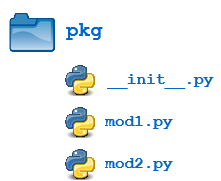
__init__
print(f'Invoking __init__.py for {__name__}')
A = ['quux', 'corge', 'grault']- Then when the package is imported, global list
Ais initialized
>>> import pkg
Invoking __init__.py for pkg
>>> pkg.A
['quux', 'corge', 'grault']