Definition
A database is a structured collection of related data, designed for specific purposes with fast access & manipulation capabilities.
- Core Idea: Structured system for storing and managing data.
- Functions: Efficient storage, retrieval, sorting, searching, updating, and deleting.
- Database (DB) - organized collection of data
- Relational Database (RDB) - the structure
- specific type of database that organizes data into tables with rows and columns
- analogy: how you organize the data inside your spreadsheet
- Database Management System (DBMS) - the software
- the software application that lets you create, read, update, and delete the data in the database
- You almost never interact with the database files directly
- analogy: Microsoft Excel or Google Sheets program
- Relational Database Management System (RDBMS)
- specific type of DBMS
- PostgreSQL
- modern programming, you create objects in your code called Entities that mirror the database table’s structure
- entity = schema (needs to be same so u can use JPA (Jakarta Persistence API))
Early Limitations
File repository
- 코드잇 과제 - File/JCF로 Repository 나눴음
- file-based storage has the following critical drawbacks: Directory Structure Example (File Storage Method)
/data
 ├── users.txt         # Stores user information
 ├── products.txt      # Stores product information
 └── orders.txt        # Stores order information
❌ Example of Problems
users.txt
---------
101,John Doe,john@example.com
101,John Doe,john.doe@newmail.com  ← Duplication and information inconsistency
orders.txt
----------
101,ProductA,2
999,ProductX,3  ← Order placed with a non-existent user ID
- Main problems
- The structure isn’t clear - No rules enforced, you could save data in the wrong format
- Cannot scale horizontally
- As an application grows, you often add more servers to handle the traffic (horizontal scaling).
- If each server has its own data file, you’ll have scattered, out-of-sync information.
- The correct way is to have multiple servers all connect to one central database
JCF Repository
Main problems
- Resets every time you run the program - in-memory
- When you store data in a
ListorMapin your program, it exists only in the computer’s RAM. RAM is volatile memory (휘발성 메모리), meaning all the data is lost as soon as the program stops.
- When you store data in a
- But it has the advantage of speed
- Accessing data from RAM is extremely fast, much faster than reading from a file on a hard drive
Why use DBs?
Problems DBs solve
- Data Duplication
- Problem: Same data stored in multiple places → inconsistency.
- DB Fix: Centralized record = update once, consistent everywhere.
- Data Integrity (무결성)
- Problem: Invalid data (e.g. order with non-existent user).
- DB Fix: Enforced constraints (e.g. FK checks) ensure valid, consistent data.
- Data Search
- Problem: Slow linear file search.
- DB Fix: Uses indexes (e.g. B Trees) for fast lookup.
- Concurrency
- Problem: Multiple users editing files = conflicts/corruption.
- DB Fix: Transaction management handles concurrent access safely (creates a list).
- Backup & Recovery
- Problem: Data loss from crashes or deletion.
- DB Fix: Built-in backup & snapshot features enable recovery.
- Lots of “backup strategies” (복구 전략)
The good parts
- Maintenance Efficiency → Schema changes propagate system-wide
- Consistent structure reduces maintenance work.
- Ex) Adding
phone_numbertoemployeesauto-reflects across APIs/UI.
- Scalability & Performance → Handles millions of records with ease
- Fast queries via indexes and optimized execution.
- Ex) 1M+ order records, still fetch user’s recent orders in <0.01s
- Collaboration Potential → Teams share a common schema = fewer integration issues.
- Easy API integration & data sharing across systems.
- Ex) FE/BE devs align via shared DB design doc.
Relational Database (RDB)
Definition
A Relational Database is a type of database that stores data in a Table format and efficiently manages data by establishing Relations between these tables.
- The key idea, developed by E. F. Codd, is that these tables can be related to each other through common fields. This structure makes the data easy to manage and query
- Think of it as the blueprint or set of rules that the (R)DBMS needs to manage the database
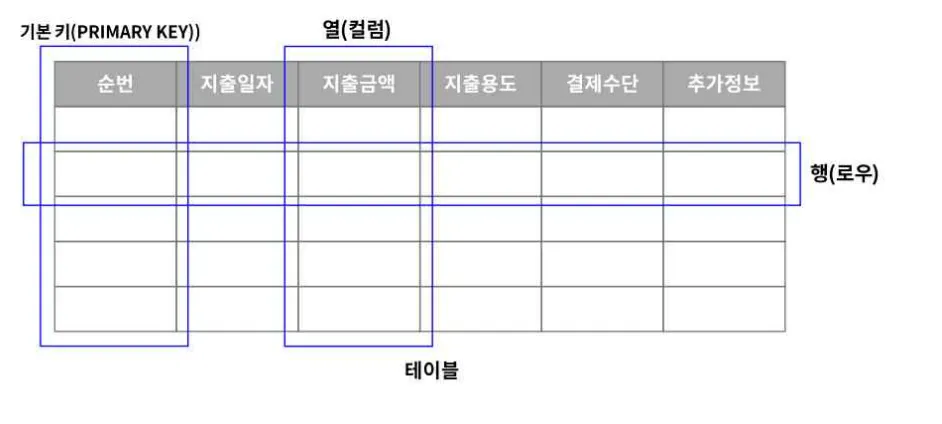
- Main components
- Table: A data set representing a single topic (e.g., users, orders).
- Row (Record): A single data entry (e.g., one user).
- Column (Field): An attribute or data item (e.g., name, email).
- Key: An identifier used to connect relationships between data (e.g., primary key, foreign key).
- Guarantees ACID thru transactions
Example
📁 Users 테이블
┌────┬────────────┬───────────────────┐
│ ID │ Name       │ Email             │
├────┼────────────┼───────────────────┤
│ 1  │ 홍길동       │ hong@example.com  │
└────┴────────────┼───────────────────┘

📁 Orders 테이블
┌────┬────────────┬────────┐
│ ID │ User_ID    │ Total  │
├────┼────────────┼────────┤
│ 1  │ 1          │ 10000  │
└────┴────────────┴────────┘
- → The
IDin theUserstable and theUser_IDin theOrderstable form a relationship (1:N).
Core Features
- Structured Format
- All data is stored in a clear row and column format. The data schema (structure) is explicitly defined
- Integrity
- Entity Integrity: A primary key cannot be duplicated or
NULL. - Referential Integrity: A foreign key must refer to a primary key of the target table.
- Entity Integrity: A primary key cannot be duplicated or
CREATE TABLE Orders (
    id INT PRIMARY KEY,
    user_id INT,
    FOREIGN KEY (user_id) REFERENCES Users(id)
);- Relation-Based Design
- Relationships between tables are explicitly defined through primary/foreign keys.
- It allows for the design of 1:1, 1:N, and N:M relationships, which is beneficial for minimizing redundancy and separating data.
- Database Normalization
- Standardized Data Processing with SQL
- Most RDBs are controlled by SQL
Database Management System (DBMS)
Role
A DBMS is the actual software that helps manage data (the db itself) systematically and process it efficiently and securely.
- Was developed to overcome prior limitations
- RBD is the model/concept, and RDBMS is the software that implements the RDB model
- Key Functions of a DBMS
- Supports data storage, retrieval, modification, and deletion.
- Transaction Processing: Ensures the atomicity of data processing.
- Concurrency Control: Allows multiple users to access data simultaneously.
- Enhances data integrity and security.
- Includes built-in backup and recovery functions.
| DBMS | RDBMS |
|---|---|
| Stores data as files, often in navigational or hierarchical form. | Stores data in tabular form (rows & columns). |
| No relationships between data; normalization not supported → redundancy common. | Tables are related; normalization + keys/indexes reduce redundancy. |
| Designed for small-scale, single-user applications. | Designed for large-scale, multi-user applications. |
| Slower with large data; limited distributed database support. | Faster due to relational model; supports distributed databases. |
| Provides low security and fewer Codd’s rules satisfied. | Provides higher security, meets all 12 Codd’s rules. |
| Lower hardware/software requirements. | Higher hardware/software requirements. |
| Examples: XML, Windows Registry, dBase. | Examples: MySQL, PostgreSQL, SQL Server, Oracle. |
Practical tools
- H2: Lightweight, in-memory relational DB
- Great for dev/testing → easy to swap later (e.g. to MySQL)
- Used when u don’t know which db u should use yet
- Redis: In-memory key-value store
- Used for caching, sessions, real-time speed boost
- Works alongside main DB, not as a replacement