Overview
An Integration Test verifies if layer interactions and environmental configurations are correct by running the application in an environment that is as similar to the actual service environment as possible.
- diagram
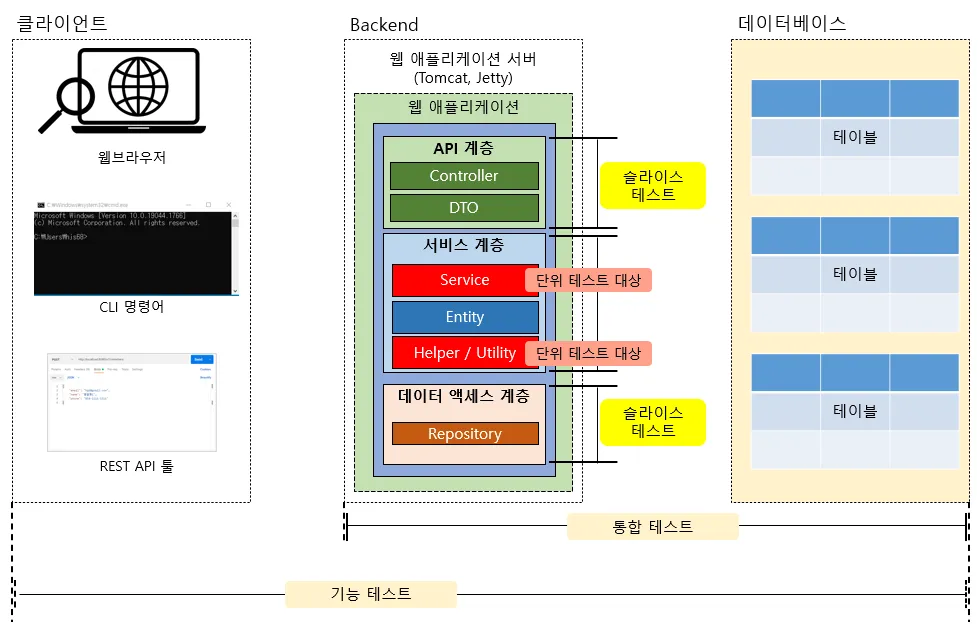
- Usually run test code written by devs without using client side tools
- typically done by the devs who built the application, unlike functional testing where an external team (QA) tests it
- For example, when a developer writes and runs a test that calls a Controller API, which then passes through the service layer and data access layer and actually connects to the database to verify expected behavior, this is considered an integration test.
- ⭐Layered Architecture
- However, since integration tests involve multiple application layers and the database, they are not fully independent and still cover a broader scope than unit tests.
- Tips
- Using Test Containers to run tests against a real database environment improves test quality.
- Consider initializing test data with SQL scripts or the
@Sqlannotation
- Put
@Transactionalon the test class to make sure your db is returned to a clean state after each method runs - We don’t really use Mockito here
- using it will defeat the main purpose
- we want to verify that real interactions between different layers work together correctly
- Does the Controller correctly call the Service?
- Does the Service correctly process data and call the Repository?
- Can the Repository successfully save and retrieve data from a real (or test-version) database?
@SpringBootTest
- The
@SpringBootTestannotation provides a test environment that includes everything—services, repositories, AOP, events, and configurations—by loading the entire Spring BootApplicationContext - This allows you to verify the following items:
- Whether bean dependency injection is performed correctly.
- Whether the interactions between the web, service, and repository layers work as intended.
- Whether the application integrates properly with the actual configuration file (
application.yml).
Example Code
@SpringBootTest                 // (1) Loads the entire Spring context
@ActiveProfiles("test")         // (2) Applies application-test.yml
@Transactional
class OrderIntegrationTest {

    @Autowired OrderService orderService;         // (3) Injects the service bean
    @Autowired OrderRepository orderRepository;  // (4) Injects the repository bean

    @Test
    void should_successfully_create_and_save_order() {
        // given: Prepare the request data for creating a test order
        CreateOrderRequest request = new CreateOrderRequest(
            "user-1",
            List.of("SKU-1", "SKU-2")
        );

        // when: Call the service method, which will also save to the DB internally
        Long orderId = orderService.createOrder(request);

        // then: Verify the saved order
        Order saved = orderRepository.findById(orderId).orElseThrow();
        assertThat(saved.getItems()).hasSize(2);               // Check that there are 2 items
        assertThat(saved.getStatus()).isEqualTo(OrderStatus.CREATED); // Check the status
    }
}@SpringBootTestloads all beans and configures the test server environment.@ActiveProfiles("test")allows the use of a test-specific database environment (e.g., H2).- All layers, including Controller, Service, and Repository, can be called.
- Because it can be slow, it’s best to write these tests only for core scenarios.
Test Profile - yaml file + @TestPropertySource
- The test environment must be separated from the production environment, as all settings—such as database connections, API addresses, and logging levels—can be different.
- We NEVER USE THE PRODUCTION DB FOR TESTING
- companies have a separate db for testing usually
- By creating an
application-test.ymlfile and selecting it with@ActiveProfiles, these specific settings will be applied when you run your tests.
spring:
  datasource:
    # Use H2 in-memory DB for tests
    url: jdbc:h2:mem:demo;MODE=PostgreSQL;DB_CLOSE_DELAY=-1
    username: sa
    password:
  jpa:
    hibernate:
      # Automatically update the schema during tests
      ddl-auto: update
    properties:
      hibernate:
        # Format the SQL logs
        format_sql: true
logging:
  level:
    root: warn
    com.example.demo: debug
How it’s used in test class w/ @TestPropertySource (example)
@SpringBootTest
@ActiveProfiles("test") // Apply the test environment configuration
@TestPropertySource(properties = {
    "app.feature-x.enabled=true",   // Enable feature X for this test
    "app.remote.timeout=500"        // Shorten the remote call timeout
})
class ProfileOverrideTest {

    @Autowired
    AppProperties props; // A class that binds to property values

    @Test
    void should_apply_test_property_overrides() {
        assertThat(props.isFeatureXEnabled()).isTrue(); // Verify it's true
        assertThat(props.getRemoteTimeout()).isEqualTo(500); // Verify the timeout value
    }
}- The
@TestPropertySourceannotation allows you to temporarily override properties for a specific test class. - This makes it easy to change values that may differ by environment, such as API endpoints, cache TTLs, and feature flags.
DB Integration Test (Testcontainers)
@Testcontainers // (1) Enables Testcontainers for the test class
@SpringBootTest
@ActiveProfiles("test")
class PostgresContainerTest {

    // (2) Creates a PostgreSQL container that runs inside Docker
    @Container
    static PostgreSQLContainer<?> postgres = new PostgreSQLContainer<>("postgres:16-alpine")
            .withDatabaseName("demo_test")
            .withUsername("demo")
            .withPassword("demo");

    // (3) Dynamically sets the datasource properties from the running container
    @DynamicPropertySource
    static void overrideProps(DynamicPropertyRegistry registry) {
        registry.add("spring.datasource.url", postgres::getJdbcUrl);
        registry.add("spring.datasource.username", postgres::getUsername);
        registry.add("spring.datasource.password", postgres::getPassword);
    }

    @Autowired
    private OrderRepository orderRepository;

    @Test
    void shouldSaveAndRetrieveOrder_inPostgresEnvironment() {
        // given
        Order order = new Order("user-1", List.of("SKU-1"));

        // when
        Order saved = orderRepository.save(order);

        // then
        Order found = orderRepository.findById(saved.getId()).orElseThrow();
        assertThat(found.getItems()).containsExactly("SKU-1");
    }
}- This approach allows you to run tests against a real PostgreSQL database that is launched in a Docker environment. 🐳
- It minimizes the differences between your local development setup and the CI (Continuous Integration) environment, leading to more reliable tests.
External API Integration (WireMockServer)
- You can use WireMock to create fake responses for external APIs, which removes network dependencies from your tests. 📲
- This makes it possible to easily test various scenarios, including success cases, failures, and delayed responses.
@SpringBootTest(webEnvironment = SpringBootTest.WebEnvironment.RANDOM_PORT)
@ActiveProfiles("test")
class ExternalApiIntegrationTest {

    static WireMockServer wireMockServer;

    @LocalServerPort
    private int port;

    @BeforeAll
    static void setupWireMock() {
        // (1) Start a WireMock server on a random available port
        wireMockServer = new WireMockServer(0);
        wireMockServer.start();

        // (2) Stub the response for a GET request to /inventory/stock
        wireMockServer.stubFor(get(urlPathEqualTo("/inventory/stock"))
                .withQueryParam("sku", equalTo("SKU-1"))
                // (3) Return a JSON response indicating the item is available
                .willReturn(okJson("{\\"available\\":true}")));
    }

    @AfterAll
    static void stopWireMock() {
        wireMockServer.stop();
    }

    @DynamicPropertySource
    static void overrideProps(DynamicPropertyRegistry registry) {
        // Override the base URL to point to the mock server
        registry.add("inventory.base-url", () -> "http://localhost:" + wireMockServer.port());
    }

    @Autowired
    private TestRestTemplate rest;

    @Test
    void shouldIntegrateWithInventoryApiCorrectly() {
        // given
        Map<String, Object> body = Map.of("userId", "u1", "items", List.of("SKU-1"));

        // when: Call our application's endpoint, which in turn calls the external inventory API
        var response = rest.postForEntity(
            "http://localhost:" + port + "/api/orders",
            body,
            Void.class
        );

        // then: Verify that our endpoint worked as expected
        assertThat(response.getStatusCode()).isEqualTo(HttpStatus.CREATED);
    }
}