Overview
Slice testing means breaking down the application into specific layers and testing each separately.
- Basically when testing a controller endpoint, the goal is to verify that the controller correctly handles the HTTP request and produces the correct HTTP response, regardless of the underlying service logic (which is mocked)
MockMvc- The key component provided by Spring Framework for testing the web layer (your controllers) without the need for a real running HTTP server (like Tomcat or Jetty)
- Used in
@WebMvcTest(slice tests) and often in full@SpringBootTest(integration tests) when you want to test the web layer. - It returns a
ResultActionsobject, which allows you to assert on the resulting HTTP response using methods likeandExpect().
Diagram
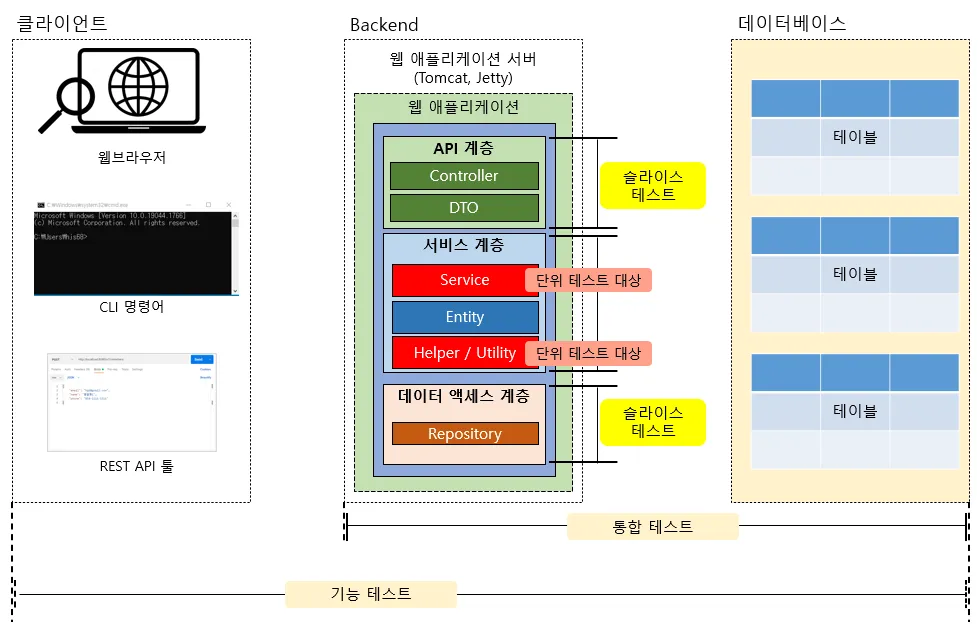
- Slice tests target specific application layers (API, service, data access)
- but because they involve HTTP and database connections, they are broader than pure unit tests and better viewed as partial integration tests.
- Often use mock (fake) objects to isolate layers
ResultActions or mockMvc.perform
MockMvcandResultActions- Both are primarily used in Spring’s MVC testing context (controller slice tests like
@WebMvcTestor full integration tests using@SpringBootTestwith@AutoConfigureMockMvc) - They simulate the environment of a Spring
DispatcherServletto test the web layer without a real HTTP server
- Both are primarily used in Spring’s MVC testing context (controller slice tests like
MockMVC- more common
ResultActions- explicitly saves the result into a
ResultActionsvariable - often used when you need to perform additional processing or if the chain gets very long
- explicitly saves the result into a
| Feature | Direct Chaining | ResultActions Variable |
|---|---|---|
| Code | mockMvc.perform(get("/orders/1")).andExpect(status().isOk()) | ResultActions actions = mockMvc.perform(get("/orders/1")); actions.andExpect(status().isOk()); |
| Focus | Concise, single fluent block. | Breaking down the execution and assertions into separate steps, which can sometimes aid readability or further processing. |
| Return | The perform() call returns a ResultActions object that is used immediately for chaining. | The ResultActions object is explicitly captured for later use. |
Example (Controller slice)
Using ResultActions
@WebMvcTest(OrderController.class)
class OrderControllerSliceTest {

    @Autowired
    private MockMvc mockMvc;

    @MockBean
    private OrderService orderService;

    @Test
    void testGetOrder() throws Exception {
		// given
        Long orderId = 1L;
        String expectedItemName = "상품1";
        OrderDto mockOrderDto = new OrderDto(orderId, expectedItemName, 2);
        given(orderService.getOrder(orderId)).willReturn(mockOrderDto);

		// when
        ResultActions actions = mockMvc.perform(get("/orders/" + orderId));

		// then
        actions.andExpect(status().isOk()) // Check HTTP status is 200
               .andExpect(jsonPath("$.id").value(orderId)) // Check JSON field 'id'
               .andExpect(jsonPath("$.itemName").value(expectedItemName)); // Check JSON field 'itemName'
        verify(orderService).getOrder(orderId);
    }
}
Using just mockMvc.perform
@Test
    void testGetOrder() throws Exception {
        // given
        Long orderId = 1L;
        String expectedItemName = "상품1";
        OrderDto mockOrderDto = new OrderDto(orderId, expectedItemName, 2);
        given(orderService.getOrder(orderId)).willReturn(mockOrderDto);

        // when & then: Execute the request and immediately assert the results
        mockMvc.perform(get("/orders/" + orderId))
               .andExpect(status().isOk()) // Check HTTP status is 200
               .andExpect(jsonPath("$.id").value(orderId)) // Check JSON field 'id'
               .andExpect(jsonPath("$.itemName").value(expectedItemName)); // Check JSON field 'itemName'
        verify(orderService).getOrder(orderId);
}- Things to note:
- Tests only the controller logic without accessing the real database.
- NO external dependencies
- The Service layer is replaced with
@MockBeanto ensure isolation. - Slice tests run quickly, making them well-suited for continuous regression testing during development.
- They are easier to write and faster to execute than integration tests.