Overview
- A small piece of data a server sends to a user’s web browser
- Cookies enable web applications to store limited amounts of data and remember state information; by default the HTTP protocol is stateless
- When login succeeds, the server generates a session ID and sends it to the client via a cookie. For every subsequent request, the server uses this cookie to look up the session and restore the user’s identity.
- Components
- Session store (in-memory, Redis, database)
- cookie settings (
HttpOnly,Secure,SameSite)
- Advantages
- Relatively simple to implement. Since the server controls sessions, it allows immediate forced logout (by deleting the session).
- Disadvantages
- Requires the server to maintain state. This means consistency across storage must be ensured when scaling (shared storage is essential).
- Best sources
Basic User sign-in system
- The user sends sign-in credentials to the server, for example via a form submission.
- If the credentials are correct, the server updates the UI to indicate that the user is signed in, and responds with a cookie containing a session ID that records their sign-in status on the browser.
- At a later time, the user moves to a different page on the same site. The browser sends the cookie containing the session ID along with the corresponding request to indicate that it still thinks the user is signed in.
- The server checks the session ID and, if it is still valid, sends the user a personalized version of the new page. If it is not valid, the session ID is deleted and the user is shown a generic version of the page (or perhaps shown an “access denied” message and asked to sign in again).
- Diagram - login
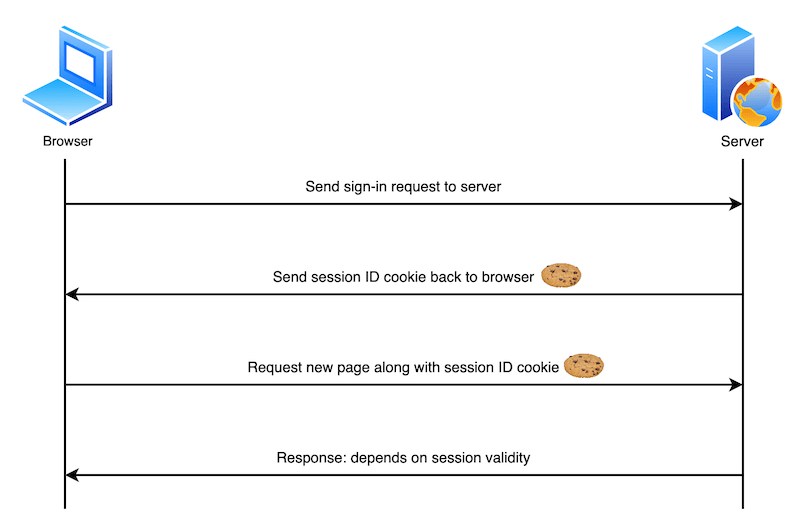
- Diagram - 1st request (login) + 2nd request

Request & Response example
Server response
- After receiving an HTTP request, a server can send one or more
Set-Cookieheaders with the response, each one of which will set a separate cookie.- A cookie is set by specifying a name-value pair like:
Set-Cookie: <cookie-name>=<cookie-value>
- A cookie is set by specifying a name-value pair like:
- The following HTTP response instructs the receiving browser to store a pair of cookies:
HTTP/2.0 200 OK
Content-Type: text/html
Set-Cookie: yummy_cookie=chocolate
Set-Cookie: tasty_cookie=strawberry

[page content]
Future client requests
- When a new request is made, now the browser usually sends previously stored cookies for the current domain back to the server within a
CookieHTTP header:
GET /sample_page.html HTTP/2.0
Host: www.example.org
Cookie: yummy_cookie=chocolate; tasty_cookie=strawberry
Cookie structure
- General format:
Name=Value - Attributes are separated by semicolons (
;) and can be eitherKey=Valuepairs or flags. Example:
Set-Cookie: SESSIONID=abc123;
Path=/;
Domain=example.com;
Max-Age=1800;
HttpOnly; Secure;
SameSite=Lax
Cookie Attributes
It’s usually the server that sends a
Set-Cookieheader in its HTTP response
- Backend developers configure those cookie attributes in the server-side code
| Attribute | Meaning | Key Points |
|---|---|---|
| Name=Value | Cookie name and value | Values cannot contain spaces, semicolons, or other special characters. Use URL encoding if needed. |
| Max-Age | Time-to-live (seconds) | Takes precedence over Expires if present. |
| Expires | Expiration time (absolute) | Must be a standardized GMT date string. |
| Secure | Sent only over HTTPS | Required for sensitive cookies. |
| HttpOnly | Blocks JavaScript access | Mitigates XSS. Strongly recommended for authentication cookies. |
| Domain | Domain scope for sending cookies | If not set, cookie is host-only. If set, applies to the specified domain and all subdomains. |
| Path | Restricts request path | Matches by prefix. Commonly set to /. |
| SameSite | Controls cross-site transmission | Default is Lax. For SSO or external redirects, use None with Secure. |
| Priority (browser-specific) | Hint for removal priority | Affects eviction order when storage limits are exceeded. |
Expiration
- Permanent cookies are deleted after the date specified in the
Expiresattribute or the period specified in theMax-Ageattribute:Max-Ageis less error prone thanExpires
Set-Cookie: id=a3fWa; Expires=Thu, 31 Oct 2021 07:28:00 GMT;
Set-Cookie: id=a3fWa; Max-Age=2592000
- Session cookies DON’T have a
Max-AgeorExpiresattribute. They’re deleted when the current section ends!
Security
- Ensure that cookies are sent securely and aren’t accessed by unintended parties or scripts
Secure- Cookies are only sent to the server with an encrypted request over the HTTPS protocol
- If client’s request is NOT HTTPS then the cookie is not sent back to client
- Insecure sites (with
http:in the URL) can’t set cookies with theSecureattribute
- It can still be unsafe - someone with access to the client’s hard disk (or JavaScript if the
HttpOnlyattribute isn’t set) can read and modify the information
- Cookies are only sent to the server with an encrypted request over the HTTPS protocol
HttpOnly- Cookie can’t be accessed by JavaScript, for example using
Document.cookie- It can only be accessed when it reaches the server. - Cookies that persist user sessions for example should have the
HttpOnlyattribute set — it would be really insecure to make them available to JavaScript
- Cookie can’t be accessed by JavaScript, for example using
Set-Cookie: id=a3fWa; Expires=Thu, 21 Oct 2021 07:28:00 GMT; Secure; HttpOnly
Locations (where cookies are sent)
- The
DomainandPathattributes define the scope of a cookie: what URLs the cookies are sent to Domain- specifies which server can receive a cookie → If specified, cookies are available on the specified server and its subdomains
- a server can only set the
Domainattribute to its own domain or a parent domain, not to a subdomain or some other domain - If the
Set-Cookieheader does not specify aDomainattribute, the cookies are available on the server that sets it but not on its subdomains
- a server can only set the
- Example
- If a server at
login.example.comsets a cookie withDomain=example.com, your browser will send that cookie to any subdomain likewww.example.com,store.example.com, orlogin.example.com. - If you don’t set it, the cookie will only be sent back to the exact domain that set it (e.g.,
login.example.comonly, notwww.example.com).
- If a server at
- specifies which server can receive a cookie → If specified, cookies are available on the specified server and its subdomains
Path- dictates which URL paths within a domain should receive the cookie (more specific than
Domain) - indicates a URL path that must exist in the requested URL in order to send the
Cookieheader
- dictates which URL paths within a domain should receive the cookie (more specific than
// domain
Set-Cookie: id=a3fWa; Expires=Thu, 21 Oct 2021 07:28:00 GMT; Secure; HttpOnly; Domain=mozilla.org

// path
Set-Cookie: id=a3fWa; Expires=Thu, 21 Oct 2021 07:28:00 GMT; Secure; HttpOnly; Path=/docs
Controlling 3rd party cookies w/ SameSite
- Types of requests
- Same-Site Request: You are browsing
yourbank.comand click a link that takes you to another page onyourbank.com. You’re navigating within the same website. - Cross-Site Request: You are on
social-media.comand click a link that takes you toyourbank.com. You are navigating from one site to another.
- Same-Site Request: You are browsing
SameSite- lets servers specify whether/when cookies are sent with cross-site requests — i.e., third-party cookies.
- helps to prevent leakage of information
- Has 3 values:
Strict,Lax,NoneStrict- causes the browser to only send the cookie in response to requests originating from the cookie’s origin site
- should be used when you have cookies relating to functionality that will always be behind an initial navigation, such as authentication or storing shopping cart information
Lax(default)- similar to
Strict, except the browser also sends the cookie when the user navigates to the cookie’s origin site (even if the user is coming from a different site) - Detailed explanation/example from Gemini 🦄
- You are logged into your favorite coffee shop’s website,
DailyGrind.com. Your browser has a cookie for it that says “User=You”, and that cookie is markedSameSite=Lax. - Now, go to a totally different site, a blog called
FoodReviews.com. That blog has a link: “Click here to see the new espresso atDailyGrind.com!” - When you click that link:
- The Action: You click a link on
FoodReviews.comthat takes you toDailyGrind.com. This is a cross-site, top-level navigation (the URL in your address bar is changing). - The Browser’s Decision: Before sending the request, your browser looks at the cookies it has for
DailyGrind.com. It finds your “User=You” login cookie. - The Rule Check: The browser checks the rule on the cookie. The rule is
SameSite=Lax. - The
LaxPermission: TheLaxrule says, “You can send me along if the user is clicking a main link to get here.” - The Result: ✅ Your browser sends the cookie with the request. When you arrive at
DailyGrind.com, the site immediately recognizes you and says, “Welcome back!” You are already logged in.
- The Action: You click a link on
- You are logged into your favorite coffee shop’s website,
- similar to
None- cookies are sent on both originating and cross-site requests → intentionally allowing cookies to be sent in a cross-site context
- The main purpose is to allow services that are embedded inside other websites to use their own cookies.
- Common use cases
- Embedded Content (like YouTube videos)
- You embed a YouTube video on your blog (
myblog.com). - When a user visits your blog, the embedded YouTube player needs to talk to
youtube.com. If the user is logged into YouTube, the player might need to access YouTube’s login cookie (SameSite=None) to know their viewing history, language preferences, or whether they have YouTube Premium (so it doesn’t show ads).
- You embed a YouTube video on your blog (
- Advertising and Analytics
- An ad network needs to show personalized ads on thousands of different websites
- The ad network uses a cookie (
SameSite=None) to track a user’s advertising ID. When you visitnews-site.com, the embedded ad fromad-network.comcan access this cookie to know what ads you’ve seen before or what your interests might be
- Embedded Content (like YouTube videos)
- Common use cases
- Note that if
SameSite=Noneis set then theSecureattribute must also be set —SameSite=Nonerequires a secure context
// strict
Set-Cookie: cart=110045_77895_53420; SameSite=Strict

// lax
Set-Cookie: affiliate=e4rt45dw; SameSite=Lax

// none
Set-Cookie: widget_session=7yjgj57e4n3d; SameSite=None; Secure; HttpOnly
Cookie Prefixes
- Cookie prefixes are special keywords at the beginning of a cookie’s name that act as a security contract, forcing the browser to enforce strict rules on that cookie
- All cookie prefixes start with a double-underscore (
__) and end in a dash (-) __Secure-- Must be set with the
Secureattribute - Must be set from a secure page (HTTPS)
- Must be set with the
__Host-- Must be set with the
Secureattribute from a secure page (HTTPS) - Must NOT have a
Domainattribute - Must have
Pathattribute set to/ - Provides strongest origin isolation → guarantees that such cookies are only sent to the host that set them
- Must be set with the
__Http-- Must be set with the
Secureflag from a secure page (HTTPS) - Must have the
HttpOnlyattribute set → Proves the cookie was set viaSet-Cookieheader (not JavaScript)- Cannot be modified via
Document.cookieor Cookie Store API
- Cannot be modified via
- Must be set with the
__Host-Http-- Combines all restrictions from
__Host-and__Http-prefixes - Must be secure,
HttpOnly, Path=”/”, no Domain attribute - Provides maximum security and origin isolation while ensuring HTTP-only scope
- Combines all restrictions from