Authentication
Overview
Verifying who you are (your identity)
- Common example: username/email + password
Maintaining authentication state
- It’s essential because of the nature of the HTTP protocol
- Each request–response cycle is independent and does not inherently preserve the user’s identity across requests
- mechanisms like sessions or tokens are required to explicitly prove “who is making this request” every single time
- Statelessness: The server treats each HTTP request as an independent event
- Methods of maintaining authentication state
| Aspect | Session-Based | Token-Based |
|---|---|---|
| Where credentials are stored | On the server (session store) | On the client (e.g., token) |
| Transmission method | Sent via Cookie (Cookie: SESSION=...) | Sent via Header (Authorization: ...) |
| State management | Server maintains state | Server can remain stateless |
| Scalability | Requires session synchronization when scaling servers | Only token validation is needed → high scalability |
| Authentication/Authorization | Used for authentication; Authorization is a separate step that happens after authentication | Authentication + Authorization |
Example code
import java.util.HashMap;
import java.util.Map;

public class AuthService {
    private Map<String, User> users = new HashMap<>();

    public boolean authenticate(String email, String rawPassword) {
        User user = users.get(email);
        if (user == null) return false;

        UserCredential credential = user.getCredential();
        String hashed = hashPassword(rawPassword); // 해시 함수 적용

        if (credential.getPasswordHash().equals(hashed)) {
            credential.setFailedLoginAttempts(0); // 성공 시 초기화
            credential.setLastLoginAt(java.time.LocalDateTime.now());
            return true;
        } else {
            credential.setFailedLoginAttempts(credential.getFailedLoginAttempts() + 1);
            if (credential.getFailedLoginAttempts() > 5) {
                credential.setLocked(true);
            }
            return false;
        }
    }

    private String hashPassword(String rawPassword) {
        // 실제로는 BCrypt, Argon2 등을 사용해야 함
        return Integer.toHexString(rawPassword.hashCode());
    }
}
Tips
- Always use strong hashing algorithms such as BCrypt or Argon2.
- Implement a login failure attempt limit policy to enhance security.
- Upon successful login, issue a Session (Cookie) or a Token to maintain the authentication state.
Authorization
Overview
What you are allowed to do (enforcing policies and rules)
- The process of determining the level of access and the specific actions that an authenticated user is permitted to perform
- Done after authentication
- You can’t determine permissions w/o a verified identity
- Permissions are tied to a subject (user or system). Before the subject is confirmed, there’s no target for policy enforcement.
- To Prevent Token/Session Forgery
- Authorization only makes sense after verifying the validity and integrity of the token or session.
- For Safe Default on Errors (Fail-Close)
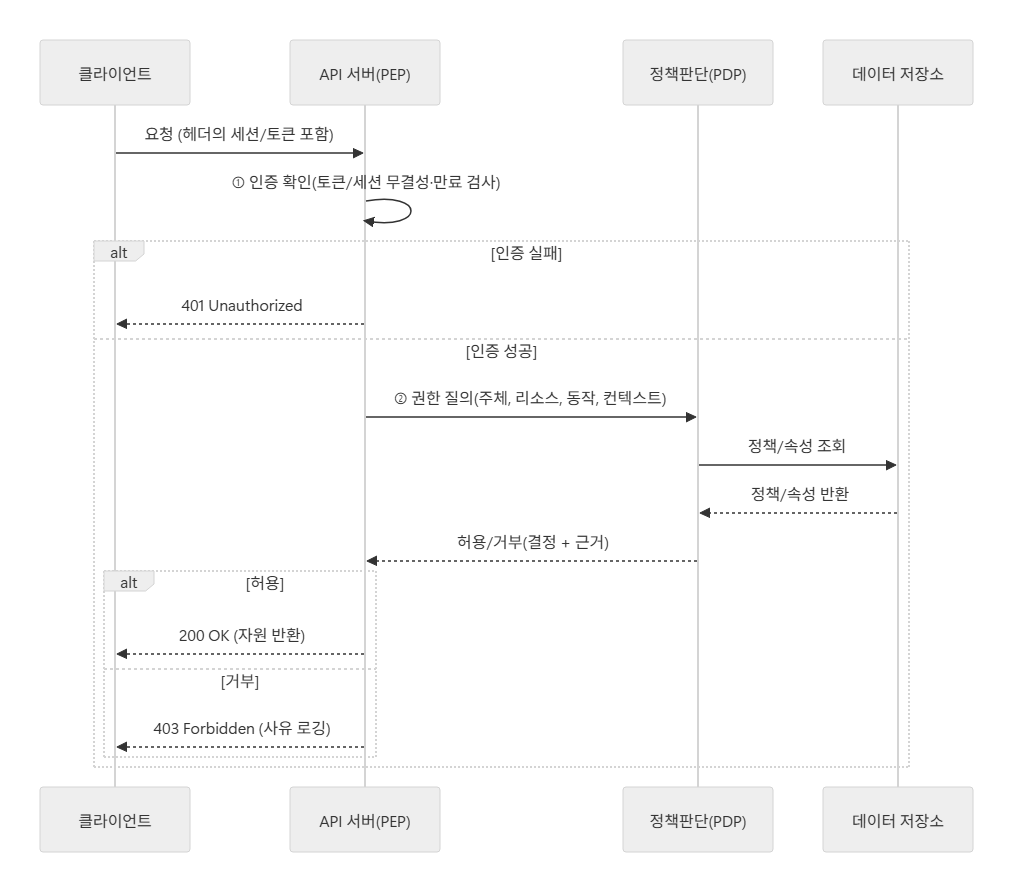
- Authentication failures should immediately result in 401 Unauthorized, while only authenticated requests are subject to fine-grained authorization (403 Forbidden).
- You can’t determine permissions w/o a verified identity
General Flow
Session-based Authorization
- Session
- How it works
- When a user successfully logs in, the server creates a session object.
- This object is stored on the server (in memory or a database like Redis) and contains the user’s identity and authorization data, such as their roles and permissions.
- The server then creates a unique session ID to act as a reference to this session object.
- The server sends this unique session ID back to the client in a cookie. The client’s browser stores this cookie, which contains only the ID and no other sensitive information.
- For every follow-up request to the server, the client’s browser automatically includes the cookie with the session ID.
- When the server receives a request, it reads the session ID from the cookie.
- It then uses this ID to retrieve the corresponding session object from its own storage.
- By accessing this object, the server instantly knows who the user is and what they are authorized to do, allowing it to grant or deny access accordingly.
- When a user successfully logs in, the server creates a session object.
Token-based Authorization
- Token
- How it works
- JWT (JSON Web Token) stores authentication information on the client side.
- The server only needs to verify the token, which makes this approach highly scalable.
- A JWT consists of
Header.Payload.Signature, and the Payload can include authorization data (e.g., roles).
- A JWT consists of