Overview
Refers to a way of maintaining state information about a user’s interactions with a website or web application
- A web session is a period of interaction between a user and a website
- When a user visits a website, the server can create a session for that user.
- Additionally, a session allows the server to keep track of information such as the user’s login status, preferences, and any data entered into forms.
- The server typically initiates a session when a user logs in to a website.
- We can identify a session by a unique session ID
- Generally, we pass the session IDs as a parameter in URLs or store them in the Cookies
- The session ID allows the server to associate the user’s requests with their specific session. Additionally, it also helps to retrieve and update the session data as needed.
- With session-based authentication, scaling servers can lead to inconsistencies, but this can be mitigated using sticky sessions, session clustering, or external session stores (e.g., Redis).
- Uses
Cookie,Set-Cookieheader- Tokens use
Authorizationheader
- Tokens use
- Authorization after Authentication
- Source
Flow
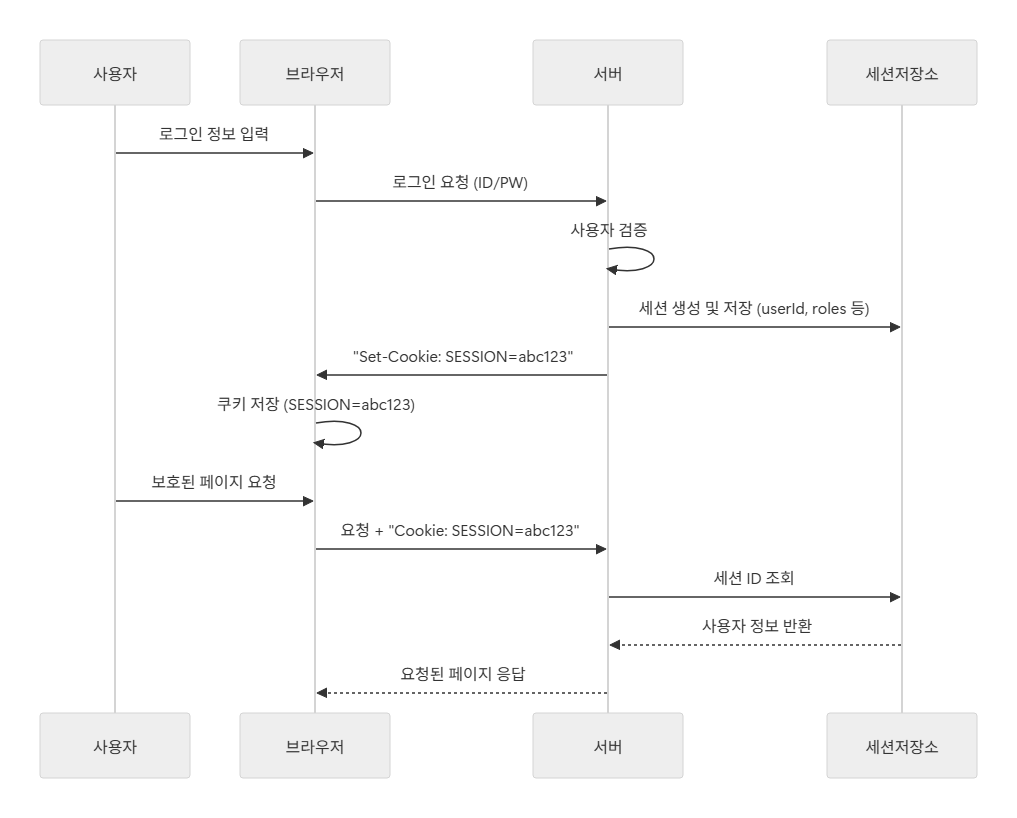
1. Session Creation and Response
- When a user logs in, the server performs ID/password verification.
- If verification succeeds, the server creates a new session object and stores the user ID and related information in the session store.
- The server generates a session ID to identify this session.
- The server sends the session ID back to the browser via the Set-Cookie header → Cookies
// server -> client (response)
HTTP/1.1 200 OK
Set-Cookie: SESSION=abc123; Path=/; HttpOnly; Secure; Max-Age=1800
- The browser stores this
Set-Cookievalue and automatically includes it in every subsequent request to the same domain.
2. Session Validation Process
- When the user tries to access a protected page, the browser automatically includes the Cookie header in the request.
- The server checks the session ID (
abc123) from the request header. - The server looks up the session ID in the session store and restores the associated user information.
- If the session is valid, the server processes the request and returns a response.
// client -> server (request, after authentication finished)
GET /mypage HTTP/1.1
Host: example.com
Cookie: SESSION=abc123
- The
Cookieheader sent back on future requests is clean and simple, containing only the necessary data- contains only the actual data without the attributes → name of cookie
Set-Cookie VS Cookie
| Header | Direction | Description | Example |
|---|---|---|---|
| Set-Cookie | Server → Browser | Instructs the browser to create or update a cookie | Set-Cookie: SESSION=abc123; Path=/; HttpOnly; Secure |
| Cookie | Browser → Server | Sends the stored cookie value back to the server | Cookie: SESSION=abc123 |
Diagram
- 1st request (login) + 2nd request (access page)
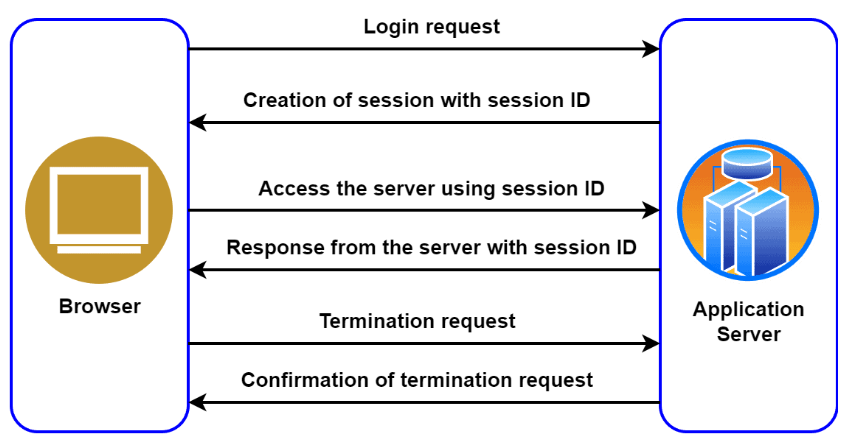
- 2nd diagram
Security
Session ID security
- Session IDs must be generated using long random values (e.g.,
UUIDv4, cryptographically secure random generator).- Avoid sequential numbers or time-based IDs → attackers could easily guess them.
- Cookie Security Attributes:
Secure: Only send over HTTPS.HttpOnly: Prevents JavaScript access → mitigates XSS.SameSite: Restricts cross-site requests → mitigates CSRF.
Set-Cookie: SESSION=abc123xyz; Path=/; HttpOnly; Secure; SameSite=Lax; Max-Age=1800
Session Expiration Policies
- Idle Timeout: Automatically expire the session if there is no activity for a set period (e.g., 30 minutes).
- Absolute Timeout: Expire the session after a fixed duration from creation (e.g., 24 hours), regardless of activity.
- Forced Logout: Allow administrators to manually expire a user’s session.
- Instruct the browser to delete the cookie using
Max-Age=0orExpiresafter some time - Logout must instantly invalidate the session so that any further requests are no longer authenticated
- Instruct the browser to delete the cookie using
Set-Cookie: SESSION=; Path=/; Max-Age=0; HttpOnly; Secure
Preventing Session Fixation
- The Problem: An attacker pre-generates a session ID and tricks the victim into using it. After login, the attacker can hijack the same session.
- Countermeasures:
- Always regenerate a new session ID upon successful login.
- Regenerate the session ID when privilege levels change (e.g., user → admin).
// On successful login
Session newSession = sessionManager.create(userId, 1800);
response.addHeader("Set-Cookie", "SESSION=" + newSession.getId() + "; HttpOnly; Secure; SameSite=Lax");